DNS Propagation Explained: What Really Happens When You Buy a Domain or Change Nameservers
What happens between clicking "Buy" and a working domain: how registrars talk to registries over EPP, how delegation, glue and DNSSEC work, why "DNS propagation" is really caching, and how to change DNS providers without downtime.
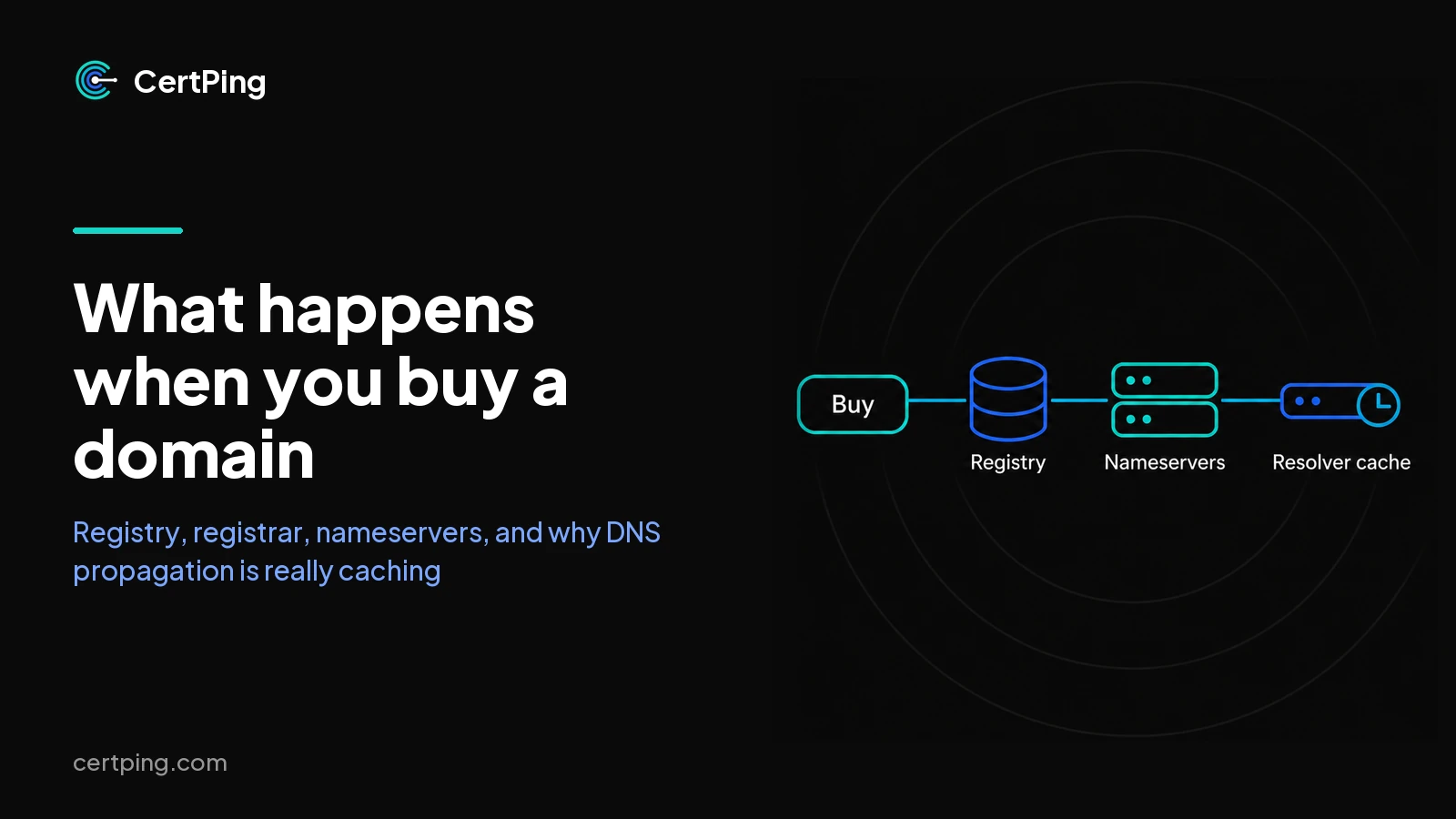
When you buy a domain, your registrar sends a create command to the registry that runs the domain's ending, or top-level domain (TLD), such as Verisign for .com. The registry records the name in its database and publishes your nameservers in the top-level domain's zone, so resolvers can find the servers that answer for your domain. "DNS propagation" is not a push of your records around the world. It is resolvers worldwide holding cached answers until each answer's time to live (TTL) runs out.
This guide follows a domain from "Buy" to a working website, then covers moving DNS without downtime and fixing a domain that stops working.
Key takeaways
- ICANN sets the rules for generic endings such as .com (country endings such as .uk set their own), the registry runs the ending, the registrar (sometimes through a reseller) sells you the name, and a DNS host answers queries for it.
- The registrar talks to the registry over EPP. The registry holds your domain's record, including its status codes. The TLD zone holds only the pointers to your DNS host: your nameserver (NS) records, any DNSSEC key fingerprint (DS) and any glue addresses.
- Nothing is pushed. Resolvers cache each answer for its TTL, and "no such domain" answers are cached too. The .com zone gives its NS records a TTL of 172,800 seconds (48 hours), which is why nameserver changes feel slow.
- To move DNS without downtime: copy every record, check the new servers answer, switch, and keep the old provider serving for at least 48 hours.
- With DNSSEC, the DS record at the registry must match a key your DNS host signs with. A mismatch makes validating resolvers return a server-failure error (SERVFAIL) for the whole domain.
Who is involved when you register a domain?
- ICANN (the Internet Corporation for Assigned Names and Numbers) sets the policies for generic endings such as .com and .org, and accredits the registrars that sell them.
- The registry operator runs one ending. It keeps the authoritative database of names under it and runs the TLD's nameservers. For .com, that is VeriSign Global Registry Services.
- The registrar has an account at the registry and sends the commands that create, renew, update and transfer your domain. The registry knows it as the "registrar of record".
- A reseller sells names through a registrar. You deal with the reseller; the registrar talks to the registry.
- The DNS host runs the nameservers that answer for your records. It can be your registrar, a separate provider or your own servers.
What is the difference between the registry database and the zone?
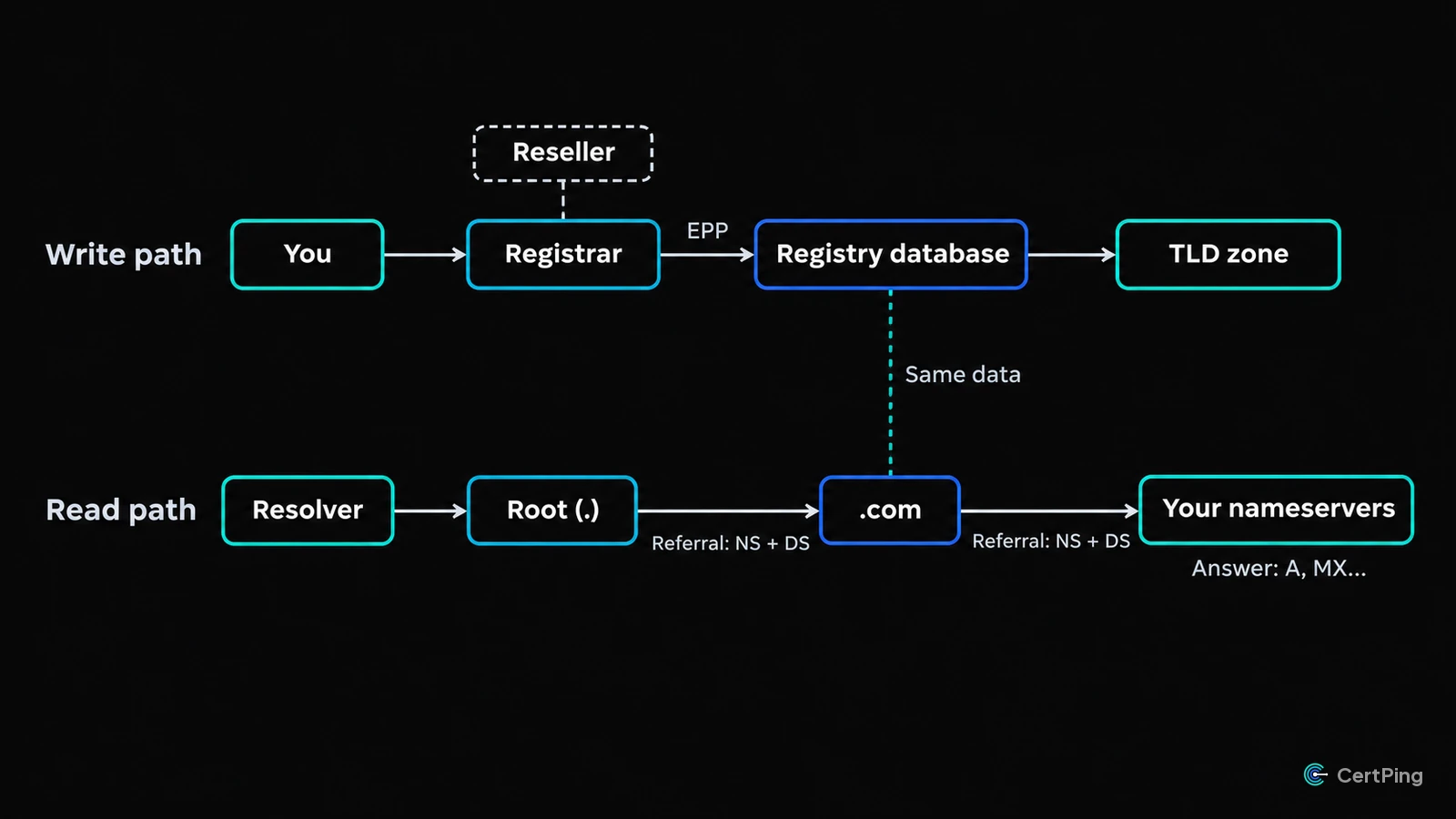
The registry database holds the full domain object: the name, its registrar, creation and expiry dates, status codes, nameservers, DS records and transfer secret. The TLD zone is what the registry publishes to the DNS, and it holds only what resolvers need to find you: your NS records, any DS records and any glue addresses.
A domain on serverHold or clientHold is still in the database but left out of the zone, so it stops resolving.
What is RDAP, and has it replaced WHOIS?
RDAP (Registration Data Access Protocol) returns registration data as structured JSON over HTTPS. ICANN requires every gTLD registry and registrar to run RDAP, and since 28 January 2025 they are no longer required to run the old WHOIS service (ICANN lists exceptions for .com, .name and .post). The IANA bootstrap file (RFC 9224) tells clients which server answers for each ending.
curl -s https://rdap.verisign.com/com/v1/domain/example.com
"status": ["client delete prohibited", "client transfer prohibited", "client update prohibited"]
"nameservers": ELLIOTT.NS.CLOUDFLARE.COM, HERA.NS.CLOUDFLARE.COM
"secureDNS": { "delegationSigned": true, "dsData": [ { "keyTag": 2371, "algorithm": 13, ... } ] }
"events": registration 1995-08-14, expiration 2027-08-13
Trimmed and simplified from the JSON, November 2026. The registry's answer names the registrar but no registrant: for .com, contact details sit with the registrar. ICANN Lookup runs the same query in a browser.
What happens when you click "Buy"?
The registrar and registry speak the Extensible Provisioning Protocol (EPP), an XML protocol carried over TLS on port 700 (RFC 5734). RFC 5730 defines it, with mappings for domains (RFC 5731), hosts (RFC 5732) and contacts (RFC 5733).
- Check. The registrar asks whether the name is available.
- Create. It sends a
domain:createwith the name, the registration period, the nameservers and an authorization secret (authInfo), the code you later need for a transfer. - Registry response. The registry creates the domain object with your registrar as its sponsor and sets the creation and expiry dates.
- Lock and settings. Many registrars then set
clientTransferProhibitedwith an update command. - Publish. The registry adds your NS records to the TLD zone. Since September 2004, Verisign has published .com changes within minutes rather than twice a day.
This is the create command from RFC 5731, shortened:
<domain:create xmlns:domain="urn:ietf:params:xml:ns:domain-1.0">
  <domain:name>example.com</domain:name>
  <domain:period unit="y">2</domain:period>
  <domain:ns>
    <domain:hostObj>ns1.example.net</domain:hostObj>
    <domain:hostObj>ns2.example.net</domain:hostObj>
  </domain:ns>
  <domain:authInfo><domain:pw>2fooBAR</domain:pw></domain:authInfo>
</domain:create>
What do EPP status codes mean?
Every domain carries one or more status codes. Codes starting with client are set by the registrar, and codes starting with server are set by the registry. ICANN's EPP status code page lists them all. The ones you will meet most often:
ok: no restrictions and nothing pending.clientTransferProhibited: the registrar lock. The registry rejects transfer requests until it is removed.clientHold/serverHold: the domain is kept out of the DNS, set by the registrar (often for non-payment or a dispute) or by the registry.inactive: no nameservers are set, so nothing is published.addPeriod: the add grace period after registration.pendingTransfer,redemptionPeriod,pendingDelete: a transfer is in progress, or an expired domain is on its way to deletion.
What is the add grace period?
The add grace period is typically the first five calendar days after registration. A registrar that deletes the name in that window gets the fee back, within limits set by ICANN's AGP Limits Policy to stop free "domain tasting".
How does delegation work?
Delegation is a parent zone pointing at the servers for a child zone. The NS records the registry publishes for you do not hold your website's address; they only say which servers to ask next.
When do you need glue records?
A glue record is an IP address the parent publishes for a nameserver. You need glue when your nameservers sit inside your own domain, for example ns1.yourbrand.com serving yourbrand.com. RFC 9471 calls these in-domain nameservers; they are often called in-bailiwick. Without glue, a resolver must resolve ns1.yourbrand.com to find the servers for yourbrand.com: a loop.
; published in the .com zone
yourbrand.com.      172800 IN NS ns1.yourbrand.com.
yourbrand.com.      172800 IN NS ns2.yourbrand.com.
ns1.yourbrand.com.  172800 IN A  192.0.2.53
ns2.yourbrand.com.  172800 IN A  198.51.100.53
The registrar creates those addresses at the registry as host objects (RFC 5732). If your nameservers are at a DNS host, such as ns1.dnshost.net, you need no glue for them.
How does a resolver find your domain?
A recursive resolver, such as your ISP's or 1.1.1.1, walks down the tree. dig +trace shows each step:
dig +trace example.com A
.             518400 IN NS a.root-servers.net.      ; 13 root servers
com.          172800 IN NS a.gtld-servers.net.      ; referral from the root
com.           86400 IN DS 19718 13 2 8ACBB0CD...
example.com.  172800 IN NS hera.ns.cloudflare.com.  ; referral from .com
example.com.  172800 IN NS elliott.ns.cloudflare.com.
example.com.   86400 IN DS 2371 13 2 C988EC42...
example.com.     300 IN A  104.20.23.154            ; answer from example.com's own servers
Trimmed output from November 2026. The root refers the resolver to .com, .com refers it to the domain's nameservers, and only those know the A record. Each referral also carries a DS record, for DNSSEC.
How does DNSSEC's chain of trust work?
DNSSEC (RFC 4033, 4034, 4035) lets a resolver check that answers were not changed in transit.
- Your DNS host signs your records and publishes the public keys as DNSKEY records in your zone.
- A DS record, a hash of your key-signing key, is sent through your registrar to the registry, which publishes it in the TLD zone next to your NS records.
- The TLD's own DS sits in the root zone, and resolvers trust the root key. Each link vouches for the next.
When the DS matches no key your servers sign with, a validating resolver must answer SERVFAIL (RFC 4035, section 5.5). Website and email vanish for those users while non-validating resolvers still work, which makes the fault confusing.
The usual causes:
- Changing DNS host while the old DS is still published. The new host signs with other keys, or not at all.
- A key rollover in the wrong order, such as dropping the old key while the old DS is still cached. RFC 6781 covers safe timing.
- A mistyped DS at the registrar.
A zone can also publish its wanted DS set as CDS/CDNSKEY records for the parent to pick up (RFC 7344, RFC 8078). Support varies by registry and registrar.
Is DNS propagation real?
- DNS has no mechanism that sends your change anywhere. Each resolver keeps a record for the TTL it came with, then asks again. "Propagation" is thousands of caches expiring at different times.
Three kinds of TTL matter:
- Record TTLs in your own zone, such as
300seconds on an A record. - Negative caching. A "this name does not exist" answer is cached too, for the lower of the SOA record's TTL and its MINIMUM field (RFC 2308, section 5). For .com, both are 900 seconds. If you looked up a name just before registering it, a resolver may say it does not exist for up to 15 minutes afterwards.
- The parent's NS TTL. .com hands out referrals with a 172,800-second TTL, so a resolver can use your old nameservers for up to 48 hours after a change. Resolvers may also cache the NS set from your own zone, which ranks above the referral (RFC 2181, section 5.4.1), so its TTL counts too.
That is why two people see different answers at the same moment: their resolvers fetched the record at different times. Operating systems and browsers keep small caches too.
How do you plan a DNS change?
- Ahead of time, lower the TTL on the records you will change, for example to 300 seconds, and wait for the old, longer TTL to pass.
- Make the change. Resolvers pick it up within the new, short TTL.
- Keep the old values working (the old server, the old mail host) until the longest old TTL has passed.
- Raise the TTLs again once things are stable.
For a nameserver change you cannot lower the TTL the registry publishes, so plan for 48 hours of overlap on .com.
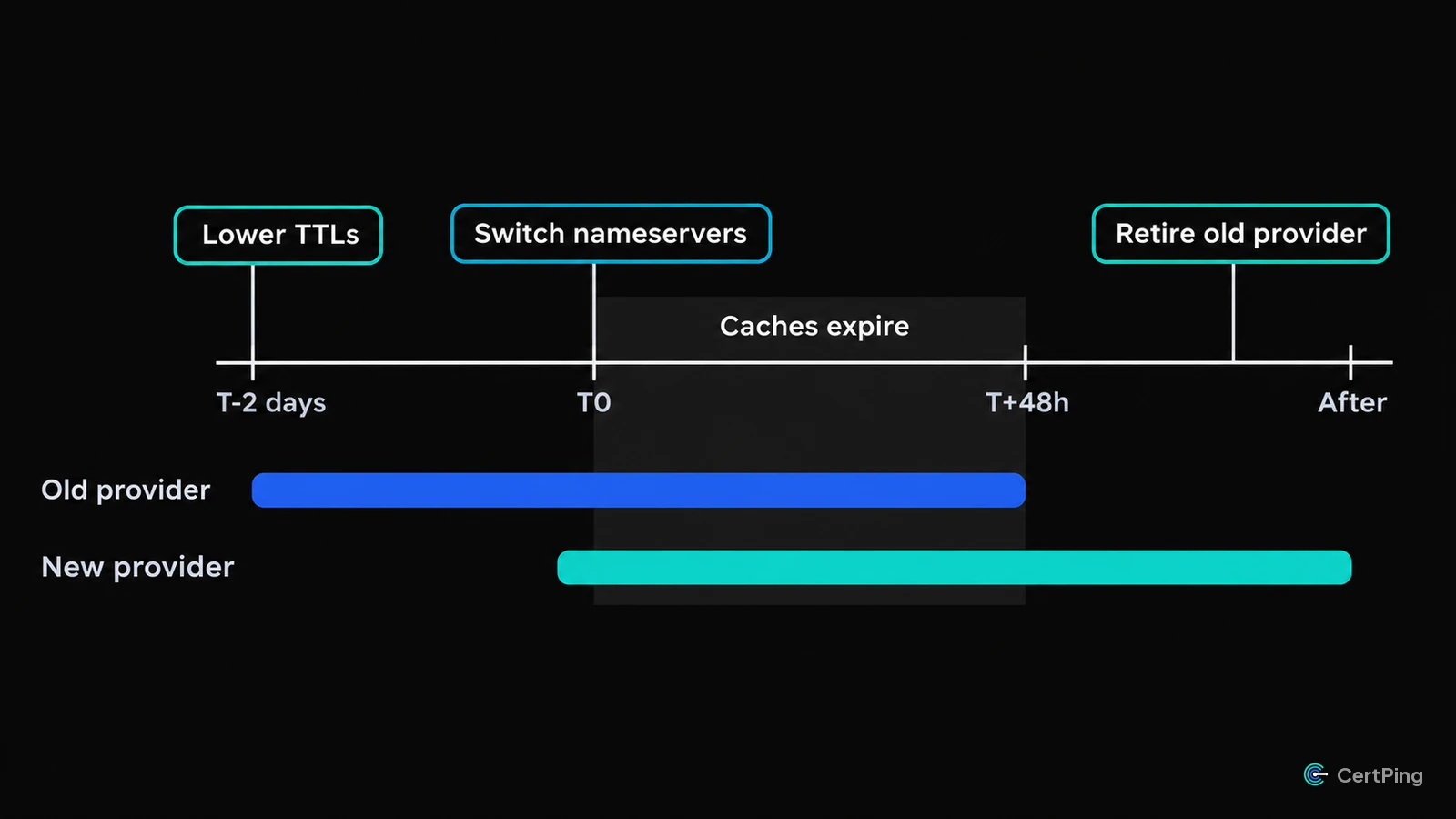
How do you move DNS providers without downtime?
- Export every record from the old provider, ideally as a zone file. Check
MX;TXTfor SPF, DKIM and DMARC; site verification records;CAA(which certificate authorities may issue for you);SRV; and every subdomain. Public lookups cannot list a zone, so anything you do not export, you must know about. - Create the zone at the new provider and add the records.
- Check that the new servers answer authoritatively before you touch the registrar.
dig @new-ns1.example.net yourbrand.com MX +norecshould show theaaflag and the right data for every important name. - Handle DNSSEC first (below).
- Lower the NS TTL in the old zone, then change the nameservers at your registrar.
- Keep the old provider serving, unchanged, for at least 48 hours, and do not edit records at only one of the two providers in that window.
If the domain is DNSSEC-signed, you have two options:
- Go unsigned for the move. Remove the DS at the registrar while the old provider keeps signing. Wait until the DS TTL has passed (86,400 seconds at .com), switch nameservers, wait for the NS change to settle, then turn on signing at the new provider and publish its DS.
- Multi-signer. Both providers publish each other's keys during the move, so the zone validates whichever servers a resolver asks (RFC 8901). This keeps DNSSEC on throughout, but both providers must support it.
How do transfers between registrars work?
A transfer moves the sponsorship of your domain to another registrar. Under ICANN's Transfer Policy:
- You need the auth code (the
authInfo) and the registrar lock off. If you cannot generate the code yourself, the registrar must provide it within five calendar days. - The old registrar has five calendar days to deny the request for a reason the policy allows. If it does not, the registry completes the transfer.
- A registrar may deny a transfer within 60 days of registration or of a previous transfer. After a change of registrant, the registrar may apply a 60-day transfer lock unless you opted out.
These rules are changing. On 7 June 2026, the ICANN Board adopted 47 recommendations from the Transfer Policy Review, including a mandatory 30-day transfer lock after registration and after a transfer (replacing today's optional 60-day ones) and dropping the 60-day lock after a change of registrant (final report summary). ICANN has not yet set an effective date, so the current policy applies until it does.
A transfer changes the sponsor, not the DNS host. If the old registrar hosts your DNS, move it first or make sure it keeps serving. For account safety, see Who holds the keys to your company domain?
My domain doesn't work: what should I check first?
Work from the registry down; each step rules out one layer.
- Registry status. Look the domain up in RDAP or at lookup.icann.org. Check the expiry date and look for
clientHold,serverHold,inactive,redemptionPeriodorpendingDelete. - Delegation. Ask a TLD server directly what it publishes:
dig @a.gtld-servers.net yourbrand.com NS +norec
dig @a.gtld-servers.net yourbrand.com DS +norec
The NS records appear in the authority section. Are they the nameservers you expect?
- Authoritative answers. Ask each of those nameservers:
dig @ns1.dnshost.net yourbrand.com A +norec
dig +nssearch yourbrand.com
You want the aa flag and the right data from every server. +nssearch shows each server's SOA serial; different serials mean the servers are out of sync.
- Resolver cache. Compare
dig @1.1.1.1anddig @8.8.8.8. The TTL column shows how long each cached answer has left. Google and Cloudflare let you flush one name from their caches. - DNSSEC. If a validating resolver returns SERVFAIL, repeat the query with checking disabled:
dig @1.1.1.1 yourbrand.com A
dig @1.1.1.1 yourbrand.com A +cd
If the +cd query answers and the plain one fails, the chain of trust is broken. DNSViz shows which link.
How CertPing fits
CertPing sells domain names as a reseller of the ICANN-accredited registrars Openprovider and NameSilo. CertPing is also ICANN-accredited (IANA ID 4899). Your domain's registrar of record is Openprovider, NameSilo or one of their partner registrars, and CertPing can tell you which.
- Registrar lock is on by default, so the registry rejects transfer requests until you turn it off.
- DNS hosting with DNSSEC is included, or you can use your own nameservers. When you turn DNSSEC on or off, CertPing orders the steps so the domain keeps resolving throughout.
- Switching a CertPing domain to CertPing DNS prepares the zone before anything changes at the registrar. You add records or import a zone file, CertPing checks its nameservers serve the zone, and an empty zone needs your confirmation. It will not move the nameservers while another host's DS is still published.
- Transferring a domain in copies its DNS first: CertPing scans your current provider's records, you review them, and CertPing DNS serves them before the nameservers move. The scan covers common hostnames only, so add anything it missed. A domain DNSSEC-signed at its current host keeps that host.
- Email forwarding is available on some domains; the dashboard shows whether yours supports it.
Prices for each ending are on the domain price list; DNS, DNSSEC and the registrar lock carry no extra charge. See pricing for the rest.
Frequently asked questions
How long does DNS propagation take?
It depends on TTLs, not distance. A record with a 300-second TTL updates everywhere within about five minutes, once any older, longer TTL has expired. A nameserver change at .com can take up to 48 hours, because .com publishes NS records with a 172,800-second TTL.
Can I speed up DNS propagation?
Only before the change, by lowering TTLs in advance. Afterwards you can flush single names at Google Public DNS and Cloudflare's 1.1.1.1, but not at other resolvers.
What is the difference between a registry and a registrar?
The registry runs a whole ending, such as .com, and keeps the authoritative list of its names. The registrar sells you a name and sends commands to the registry for you. A reseller sells through a registrar.
Why does my new domain not resolve right after I buy it?
Check its status first: a new domain with no nameservers is inactive, and some registrars hold new domains until payment or contact verification clears. If you looked the name up before buying, a resolver may also have cached "does not exist" for up to 15 minutes at .com.
What happens if my DS record is wrong?
Validating resolvers return SERVFAIL for every name in the domain, so the website and email stop for their users. Remove or correct the DS at your registrar, then wait for the DS TTL to pass.
Does transferring my domain change my DNS?
Not by itself: the nameservers stay as they are. But if the old registrar hosted your DNS, it may stop serving once you leave, so move the DNS first.
Sources
- IANA root zone database: .com
- ICANN: Registration Data Access Protocol (RDAP)
- RFC 9224: Finding the Authoritative RDAP Service
- RFC 5730–5734: Extensible Provisioning Protocol
- ICANN: EPP status codes
- ICANN: AGP Limits Policy
- RFC 9471: DNS Glue Requirements in Referral Responses
- RFC 4033, RFC 4034, RFC 4035: DNSSEC
- RFC 6781: DNSSEC Operational Practices, Version 2
- RFC 7344 and RFC 8078: CDS and CDNSKEY
- RFC 8901: Multi-Signer DNSSEC Models
- RFC 2308: Negative Caching of DNS Queries
- RFC 2181: Clarifications to the DNS Specification
- ICANN Transfer Policy
- ICANN Board resolutions, 7 June 2026
- Verisign on rapid .com/.net zone updates (NANOG, July 2004)