Is Your Website Up Right Now? 6 Monitoring Checks for the Cyber Monday Rush
A homepage that loads does not mean customers can buy. Website and SSL monitoring in plain words, what last year's Black Friday outages taught, and six checks to set up before Cyber Monday.
Most small businesses learn their website is down the same way: a customer tells them. On a quiet Tuesday that costs a few visits. Between Black Friday and Cyber Monday it can cost the best sales days of the year.
Website monitoring means a computer outside your business checks your site on a schedule and tells you the moment something breaks. It is cheap, simple to set up, and one of the few things you can still do today that will pay off this weekend.
Here is what last year's holiday outages show, what a site needs to stay up, and six checks to set up before Monday.
What last year's holiday outages show
Two incidents from the 2025 season are worth remembering, because neither was caused by the stores that suffered.
- 18 November 2025, Cloudflare. A change to a database's permissions made a configuration file for Cloudflare's bot protection roughly double in size. Cloudflare's proxy software could not handle it and failed. Visitors to sites behind Cloudflare saw error pages for about three hours, from about 11:20 to 14:30 UTC, with all services back to normal by 17:06 UTC. A second, shorter outage on 5 December 2025 lasted about 25 minutes and affected about 28% of the HTTP traffic Cloudflare serves.
- 1 December 2025, Shopify on Cyber Monday. Engadget reported that some merchants could not log in to their store admin, and point-of-sale systems were affected for part of the day. Shopify said it had "found and fixed an issue with our login authentication flow", and later that the problem "had a system degradation that has now been mitigated".
The lesson is not that these companies are unreliable. It is that your website depends on a chain of services, and you need to hear about a break in any of them before your customers do.
A homepage that loads is not the whole story
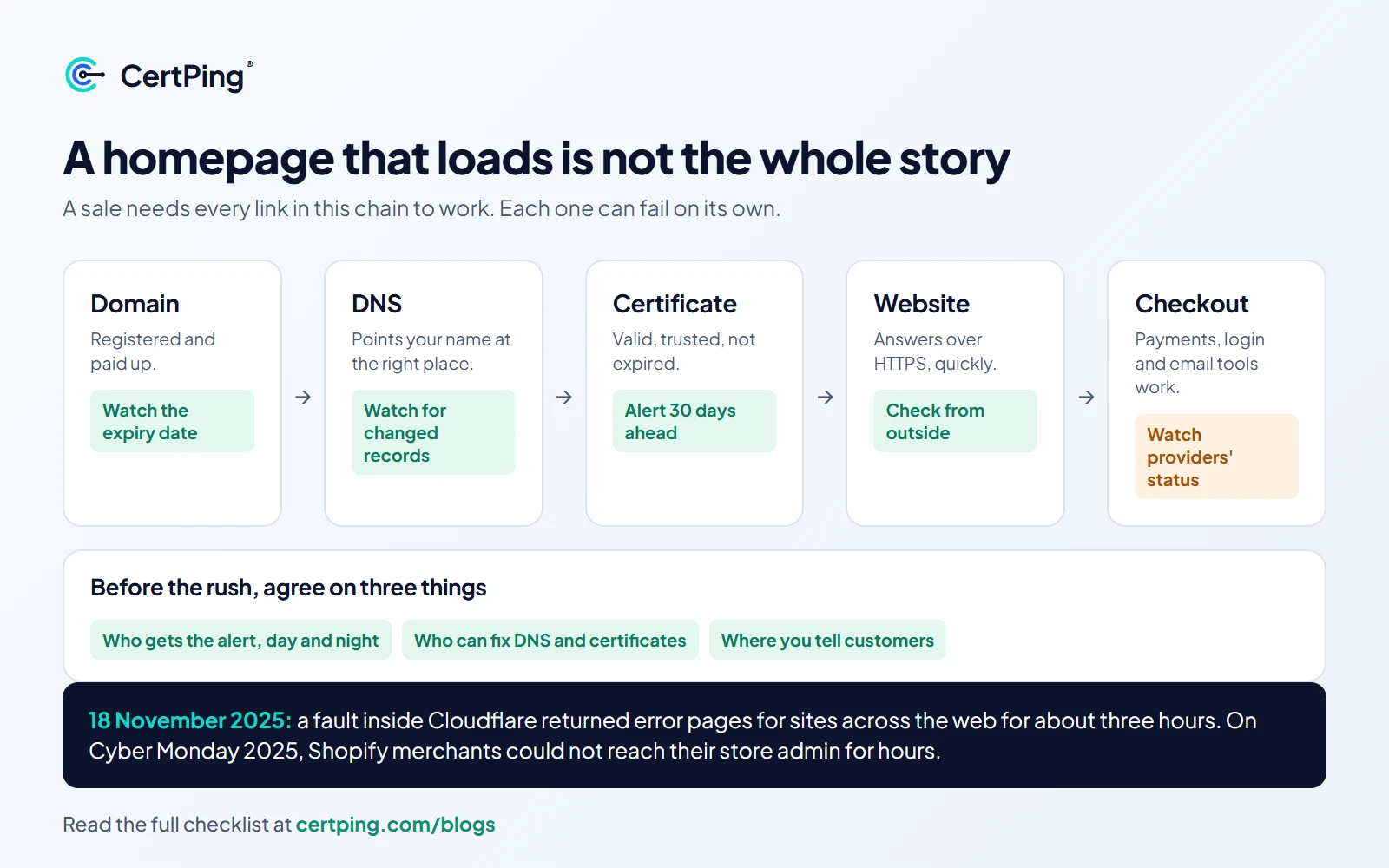
For a customer to buy from you, every link has to work:
- Your domain is registered and paid up.
- Your DNS sends your name to the right server.
- Your SSL/TLS certificate is valid, so browsers show the padlock instead of a full-page warning.
- Your website answers over HTTPS, in a reasonable time.
- Checkout works: the payment provider, login, and the email or SMS tools that send confirmations.
An expired certificate or an expired domain looks to a customer exactly like an outage. So does a DNS record someone changed by mistake. Good monitoring watches all of them, not just "is the server on".
6 monitoring checks to set up before Monday
1. Check your site from outside, on a schedule
Your own laptop is a poor monitor: it may have the page cached, and it is on your network. An external check visits your site over HTTPS from somewhere else and records whether it answered.
- Watch the pages that earn money, not only the homepage: a product page and the cart or checkout page.
- If your tool supports it, check that the page contains a word you expect, such as your shop name or "Add to cart". A server can answer "OK" while showing an error message.
- Decide how often. Every few minutes catches short outages; hourly checks are fine for most small sites, but a brief outage between checks can go unseen.
2. Watch your certificate, not just your site
Certificates are getting shorter-lived: the maximum is 200 days now, falling to 100 days in 2027 and 47 days by 2029. More renewals mean more chances for one to fail quietly.
Your monitoring should alert you:
- 30 days before a certificate expires, so there is time to fix a failed renewal
- when a certificate has expired, in case the early warning was missed
- when the certificate does not match the name, or was issued by an authority you do not use
If renewal is automatic, check that it actually ran. Automatic renewal that fails silently is a common cause of holiday weekend outages.
3. Watch your domain's expiry date
When a domain expires, the website and email stop together. Before the holidays:
- Check the expiry date of every domain your business uses, not just the main one.
- Turn on auto-renew, and make sure the card on file has not expired.
- Make sure renewal emails go to a shared inbox, not to someone who has left.
4. Know who can change your DNS
DNS changes are a quiet cause of outages: a new agency "tidies up" records, or a migration leaves an old value behind.
- Take a screenshot or export of your DNS records today, so you can compare if something breaks.
- Check who has access to your registrar and DNS provider accounts, and remove people who have left.
- Agree that nobody changes DNS this weekend unless something is broken.
5. List the providers you depend on, and follow their status pages
Write down every outside service your store needs: hosting or store platform, CDN, payment provider, email and SMS tools. Subscribe to each one's status page or alerts. When your monitor fires, the first question is "is it us or them?", and their status page often answers it in seconds.
6. Send alerts to the right people, and plan what you will tell customers
An alert nobody sees is not monitoring. Before the weekend:
- Send alerts to at least two people, through a channel they will notice outside office hours.
- Agree who can fix DNS, certificates and hosting, and how to reach them.
- Prepare a short message for social media or email: what is wrong, that you are on it, and where to check for updates.
- Test it. Pause a check or point one at a page that does not exist, and confirm the alert arrives.
What to do in the first 15 minutes of an outage
- Confirm it. Open the site on your phone using mobile data, not office Wi-Fi.
- Check the obvious. Is the certificate valid? Is the domain paid up? Did anyone change DNS today?
- Check your providers' status pages. If a provider is down, follow their updates rather than changing your own setup in a hurry.
- Tell customers. A short, honest post saves you dozens of individual replies.
- Write down what happened once it is fixed, so next year's checklist is better.
How CertPing helps
CertPing is a domain trust platform: your domains, DNS, certificates and email security in one place. Several links in the chain above sit in one dashboard.
- Website and SSL monitoring, on request. CertPing checks each website once an hour over HTTPS, or on a TCP port you name, and emails your workspace admins when a site is down after three failed checks in a row, when it is back, when a certificate expires within 30 days and when it has expired. It also records certificate details and daily uptime and response time. Our team turns it on per workspace for customers who ask.
- Free SSL certificates. Let's Encrypt certificates are free on every plan, with email reminders before they expire.
- Domains and DNS together. Register or transfer domains with DNS included. CertPing sends renewal reminders about 30 and 7 days before each renewal date, and again after expiry if a domain has not renewed. Registrar lock is on by default and DNSSEC is included with DNS hosting.
To be clear about the limits: CertPing's monitoring checks hourly, from CertPing's servers rather than from several locations around the world, and it does not measure page speed in visitors' browsers or test your checkout flow. For a busy store, pair it with a provider's status alerts and a quick manual test of checkout.
Frequently asked questions
What is website monitoring?
A service that checks your website from outside on a schedule and alerts you when it stops answering, answers with an error, or its certificate is close to expiring.
What is the difference between uptime monitoring and SSL monitoring?
Uptime monitoring checks that your site answers. SSL monitoring checks the certificate it presents: who issued it, whether it matches your name and how many days are left. A site can be "up" and still show visitors a certificate warning.
How often should my website be checked?
Hourly is enough to catch most problems on a small site. Busy stores often check every few minutes during peak periods, because a short outage at checkout is expensive.
My site is on Shopify or another platform. Do I still need monitoring?
Yes. The platform runs the servers, but your domain, DNS and sometimes your certificate are still yours to watch, and outside monitoring tells you when customers cannot reach you, whatever the cause.
Sources: Cloudflare, "Cloudflare outage on November 18, 2025" and "Cloudflare outage on December 5, 2025"; Engadget, "Shopify was down for much of Cyber Monday", 2 December 2025.