Look-Alike Domain Detection: How to Find Impersonating Domains and Spot Real Threats
Thousands of names look like yours, but only a few are dangerous. Learn how look-alike domains are generated, how tools like dnstwist find them, and which signals (new registration, live mail, cloned page, fresh certificate) mean a real phishing threat.
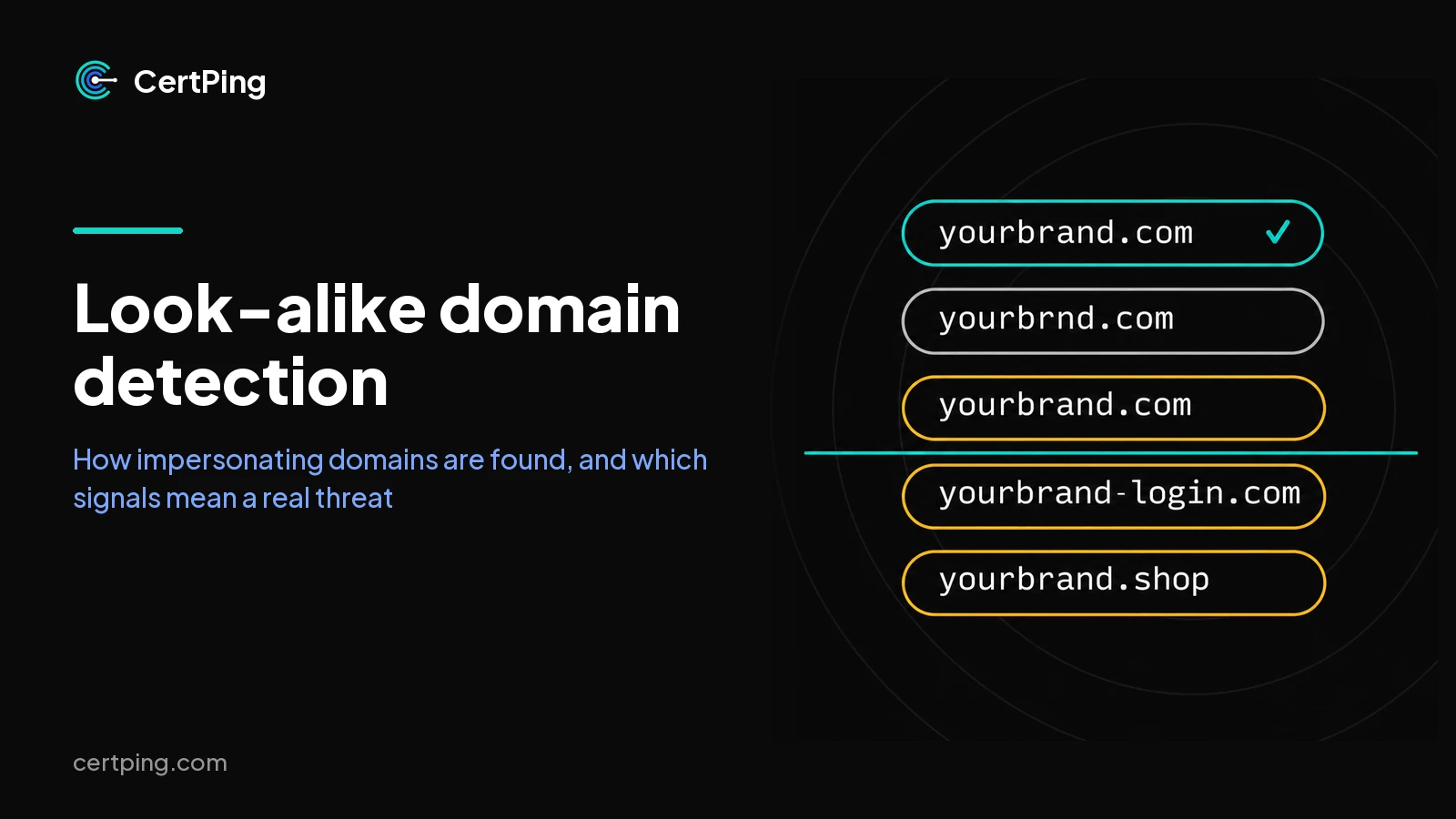
Look-alike domain detection works in two steps. First, software generates every plausible imitation of your domain: typos, swapped letters, look-alike characters, other endings and added words such as "login". Then it checks which of those names are registered and scores the live ones. The signals that predict abuse are a recent registration, mail servers that can send or receive email, a page that looks like yours and a fresh TLS certificate. Generating candidates is easy. Telling the dangerous few from thousands of harmless names is the real work.
Key takeaways
- One short domain such as
yourbrand.comproduces more than 6,000 permutations in the open-source tool dnstwist. Almost all of them are unregistered or harmless. - Combosquatting, your name plus a word (
yourbrand-login.com), is far more common than typos. A 2017 study found it about 100 times more prevalent than typosquatting. - The strongest threat signals are a recent registration, working mail servers (MX) and a live page that looks like yours. A new certificate in Certificate Transparency logs is a useful early warning.
- Browsers show risky Unicode names as punycode (
xn--...) using rules based on Unicode TR39, but email clients and apps don't always apply the same rules. - A registered look-alike is not proof of abuse. Parked pages, your own defensive registrations and real businesses with similar names are common false positives.
What is a look-alike domain?
A look-alike domain is a domain name chosen to be mistaken for yours. Typosquatting uses spelling mistakes (yourbrnad.com). Combosquatting adds words to your exact name (yourbrand-support.com). A homograph uses characters from another alphabet that look identical to yours. All of them are real, separately registered domains. The attacker owns them outright, so they can have valid email authentication and a valid HTTPS certificate, as our domain security guide explains.
Why do look-alike domains work?
They work because people don't read domain names letter by letter.
- Reading by shape. Readers recognise familiar words at a glance, so
yourbrnad.comoryourbrand-billing.compasses a quick look. - Small screens. A phone's address bar can show only part of a long hostname. Chrome's URL display guidelines say to cut labels from the front and keep the registrable domain (the part you buy, such as
yourbrand.com) visible, but few people know that is the part to check. - Email clients. Many show the sender's display name rather than the address, and a link's text can say
yourbrand.comwhile it points somewhere else. - Subdomains. In
yourbrand.com.account-check.net, the registrable domain isaccount-check.net. Everything to its left is a label the attacker typed into their own DNS.
How are look-alike domains generated?
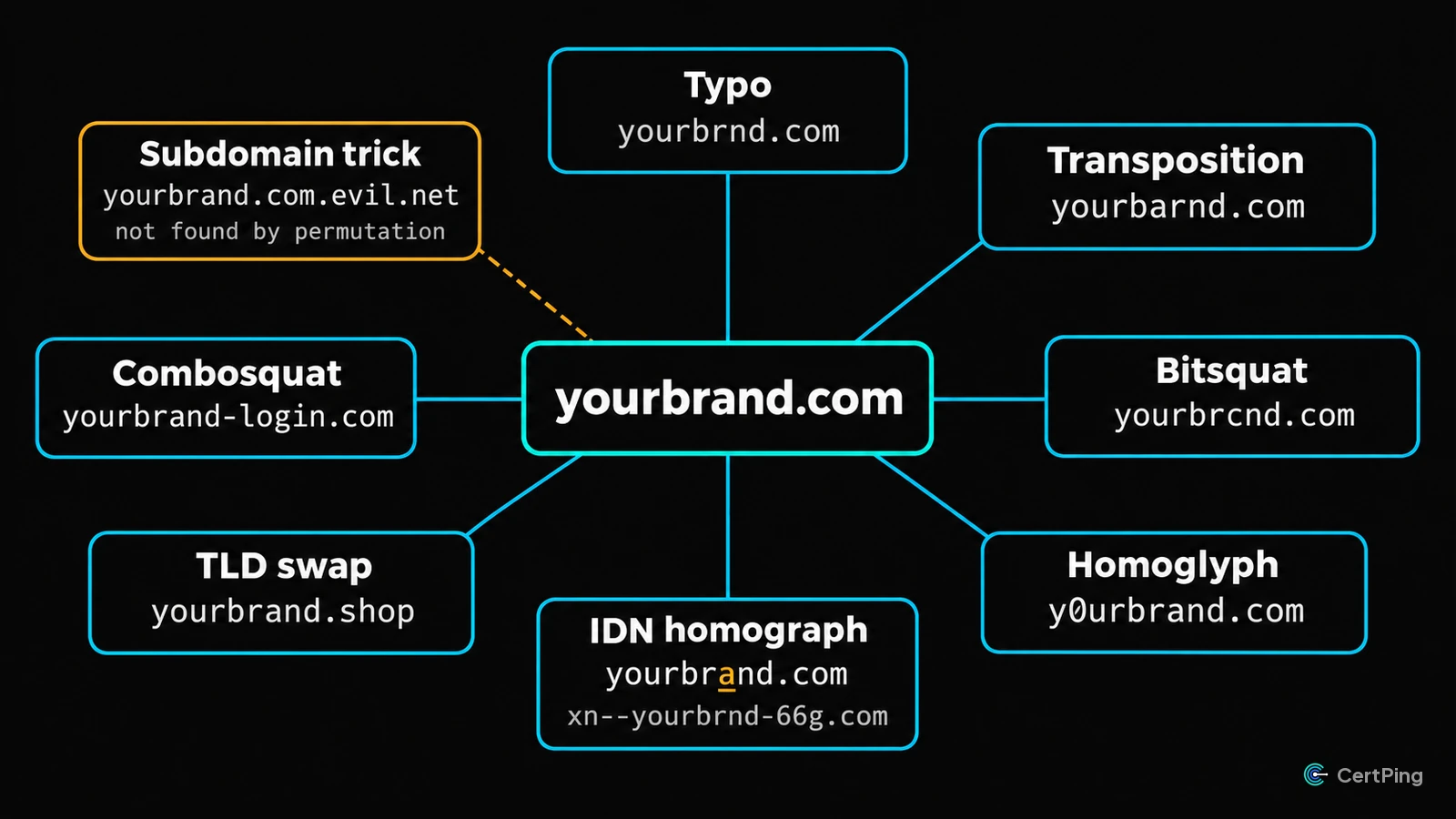
Detection tools start with permutation: they apply fixed rules to your name and list every result. These are the main families, with real outputs from dnstwist for yourbrand.com.
Typos: addition, omission, repetition, replacement and insertion
- Addition appends a character:
yourbrand1.com. - Omission drops one:
yourbrnd.com. - Repetition doubles one:
yourbrrand.com. - Replacement swaps a character for a neighbouring key on QWERTY, QWERTZ or AZERTY keyboards:
yourbrabd.com. - Insertion adds a neighbouring key next to the intended one:
yourbranmd.com.
Transposition, vowel swap, hyphenation and plurals
- Transposition swaps two adjacent letters:
yourbarnd.com. - Vowel swap:
yourbrond.com. - Hyphenation:
your-brand.com. - Plural or inserted "s":
yoursbrand.com.
Bitsquatting
Bitsquatting registers names that differ from yours by one flipped bit in a character's binary code. Nobody types yourbrcnd.com. A computer produces it when a bit in memory flips, from manufacturing defects, overheating or cosmic rays. Artem Dinaburg registered bit-flipped versions of popular domains, such as mic2osoft.com, and between September 2010 and May 2011 logged 52,317 such requests from 12,949 IP addresses. The risk is highest for domains that machines resolve constantly, such as CDNs and update servers.
Homoglyphs and IDN homographs
A homoglyph is a character that looks like another one: 0 for o (y0urbrand.com), rn for m, l for I. Internationalized domain names (IDNs) allow Unicode letters, which widens the choice: Cyrillic "а" (U+0430) and Latin "a" (U+0061) look the same in most fonts. In DNS an IDN is stored as punycode, an ASCII encoding defined in RFC 3492: yourbrаnd.com with a Cyrillic "а" is really xn--yourbrnd-66g.com.
TLD swaps and new gTLDs
The same name under another ending: yourbrand.net, yourbrand.co, yourbrand.shop. Hundreds of new generic TLDs, such as .app, .online and .support, give attackers a believable ending for almost any lure.
Combosquatting and dictionary words
Combosquatting adds a word: yourbrand-login.com, secure-yourbrand.com, yourbrandpay.com. For their ACM CCS 2017 paper, Kintis and colleagues analysed more than 468 billion DNS records. They found 2.7 million combosquatting domains targeting 268 popular trademarks, about 100 times more than typosquatting domains, and almost 60% of the abusive ones stayed live for more than 1,000 days. Combosquatting has no fixed generation rule, so tools cover it with dictionaries of words common in phishing, such as login, account, verify and secure.
Subdomain tricks
dnstwist's subdomain fuzzer inserts a dot (your.brand.com), which matters only if someone registers brand.com. The more common trick, yourbrand.com.evil.net, is invisible to permutation scanning, because the attacker never registers a name based on yours. Certificate Transparency searches and reports from users catch it instead.
What is dnstwist and what does it check?
dnstwist is an open-source domain permutation engine, licensed under Apache 2.0 and widely used by security teams. As of November 2026, the latest release on PyPI is version 20250130. Its fuzzers are addition, bitsquatting, cyrillic, homoglyph, hyphenation, insertion, omission, plural, repetition, replacement, subdomain, transposition, vowel-swap, dictionary, tld-swap and various. Two of them need inputs: a word list (--dictionary) and a TLD list (--tld). various covers special cases such as yourbrandcom.com.
For each permutation it resolves A, AAAA, NS and MX records, which shows what is registered. Optional checks add:
--mxcheck: whether the look-alike's mail server accepts mail for a random address, a sign it could collect misdirected email.--banners: HTTP and SMTP server banners.--whois: creation date and registrar.--geoip: the country of the IPv4 address.--lsh: fuzzy hashing of the page's HTML (ssdeep by default, TLSH optional), compared with your page as a percentage.--phash: a perceptual hash of a headless-Chromium screenshot, for visual similarity.
How do browsers decide to show punycode instead of Unicode?
Browsers check each label against rules and show xn-- punycode when a label looks risky. Chrome's IDN policy falls back to punycode when a label mixes scripts beyond the "Highly Restrictive" level of Unicode TR39, and it always shows punycode for a label that mixes Latin, Cyrillic and Greek. It also uses TR39 confusables: it reduces each label to a "skeleton" and compares it with top domains. Separately, Chrome shows a warning page when a hostname's skeleton matches a top site or a site you use often.
The hard case is the whole-script homograph: every letter comes from one script, so nothing is mixed. In 2017 researcher Xudong Zheng registered xn--80ak6aa92e.com, which Chrome and Firefox then displayed as "аррӏе.com" in Cyrillic. Chrome now shows whole-script confusables as punycode unless the TLD is one where that script is expected. Firefox applies a similar profile, described in its IDN display algorithm.
Registries add a second filter. ICANN's IDN Implementation Guidelines ask registries to take a label's characters from one script, except for languages that need several, and to publish the characters they allow. For some endings, dnstwist limits homoglyphs to the characters that registry allows. For others, including .com, it uses a general list, so some candidates could never be registered.
Why is the candidate list so huge?
Run dnstwist's default fuzzers on yourbrand.com and you get 6,322 names. Of those, 6,050 are homoglyph combinations and the rest are typos, bit flips and the like. Add the project's English phishing word list and common TLD list and it reaches 6,628. Longer names produce more.
Most of those names are unregistered, and many registered ones are parked, owned by you or used by an unrelated business. Alerting on all of them trains people to ignore alerts. The real question is which ones are dangerous right now.
Which signals separate a real threat from noise?
Registration and its age
A registered name is the first filter, and its age is one of the strongest predictors. In a 2019 study, Palo Alto's URL filtering flagged over 70% of newly registered domains (registered or re-registered in the previous 32 days) as malicious, suspicious or not safe for work, almost ten times the rate for the Alexa top 10,000. A look-alike registered last week deserves attention. One registered in 2009 by a company that has used it ever since usually doesn't.
Resolving to an address
A name with A or AAAA records points somewhere. Alone that is weak, because parked names resolve too, but a name that resolves nowhere can't host a page.
Mail servers (MX)
MX records mean the domain can receive mail, and SPF, DKIM or DMARC records mean someone set it up to send. That is the infrastructure of business email compromise (BEC): invoices and payment changes sent from yourbrand-billing.com. The FBI's 2025 IC3 report records more than $3 billion in BEC losses, second only to investment fraud. A null MX (0 ., defined in RFC 7505) declares that a domain accepts no mail, which lowers the risk.
A live page that looks like yours
A page whose HTML or screenshot closely matches yours is the clearest sign of active phishing. Fuzzy and perceptual hashes catch copies, but a phishing page can look the same with completely different HTML, so a low score doesn't clear a site. A page that redirects to your real site is often a defensive registration.
A new certificate in Certificate Transparency
Certificate Transparency (CT) is a set of public, append-only logs of TLS certificates (RFC 6962). Chrome requires publicly trusted certificates to be logged, under its CT policy. A new certificate for a look-alike shows someone is preparing to serve HTTPS on it, often before anyone has reported the site. Free certificates are routine, so a certificate is not proof of malice. CT searches also catch subdomain tricks that permutation misses.
Parked or for-sale pages
A parking or for-sale page is a lower immediate risk, but not zero. Parked names can start receiving mail or change owner at any time, so keep watching them.
Registrar and hosting reputation
Nameservers, hosts or IP ranges that keep appearing in past phishing raise the risk. This signal needs threat-intelligence data most small teams don't have.
Your own defensive registrations
Names you registered yourself to block squatters match every rule. Keep a list of them and exclude them, or they will crowd out real alerts.
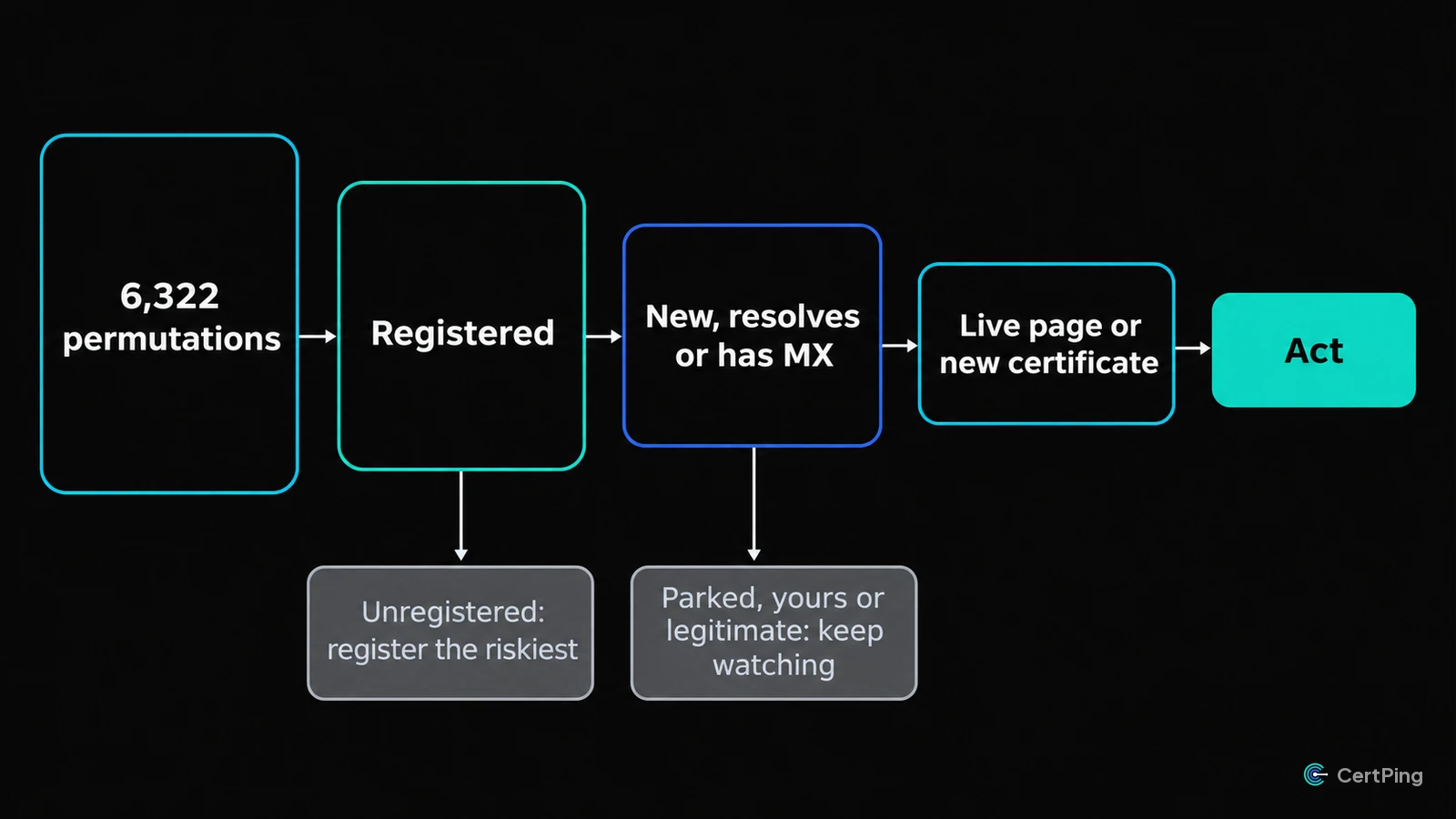
A practical way to combine these signals:
- Ignore unregistered names, but shortlist the most confusable ones to register defensively.
- Rank registered names by how confusable they are and how recently they were registered.
- Raise anything new that has working MX or a live page.
- Treat high visual or content similarity, or a fresh certificate, as urgent.
- Review the rest periodically, because parked names change.
What about false positives?
Short or common-word brands collide with real businesses all the time. If you are Yourbrand Analytics, yourbrands.com may be a furniture shop that has traded for ten years, and under the dispute rules below a registrant with "rights or legitimate interests" keeps the name. Check the age, content and owner before you act, and record why you closed a finding.
What should you do when a look-alike is malicious?
- Capture evidence first: screenshots, the full URL, DNS and RDAP records, the certificate, and email headers if mail was involved. Pages vanish quickly.
- Report it to the registrar and the host. Find the registrar and its abuse contact with ICANN Lookup. Since 5 April 2024, ICANN's registrar contract requires registrars that receive actionable evidence of phishing to take prompt action to stop or disrupt it.
- Report it to browser blocklists: Google Safe Browsing and Microsoft SmartScreen. This can protect visitors before a takedown.
- Use dispute procedures for the name itself. Under the UDRP, a domain can be transferred or cancelled if you prove it is confusingly similar to your trademark, the holder has no legitimate interest, and it was registered and used in bad faith. The faster URS covers new gTLDs, needs clear and convincing evidence, and only suspends the name. Both need trademark rights. The UDRP can accept an unregistered mark with evidence, but the URS needs a registered mark in current use, which is one reason to register yours.
Our post on copycat sites using your business name covers the customer-facing side, and the one on phantom squatting covers addresses that AI assistants invent.
How do you run a basic look-alike check with dnstwist?
- Install it with
pip install "dnstwist[full]",brew install dnstwistor the official Docker image. - Run a scan that shows only registered names, with mail, WHOIS and HTML-similarity checks:
dnstwist --registered --mxcheck --whois --lsh yourbrand.com
- Add combosquatting words and other TLDs with the lists in the project's repository:
dnstwist --registered --dictionary dictionaries/english.dict --tld dictionaries/common_tlds.dict yourbrand.com
- Save results with
--format csvor--format json, so you can compare scans over time.
Each row shows the fuzzer, the domain and what was found. This example is illustrative, with documentation IP addresses:
*original     yourbrand.com      192.0.2.10 NS:ns1.yourdns.example MX:mx.yourbrand.com
addition      yourbrand1.com     203.0.113.7 NS:ns1.parking.example CREATED:2014-03-02
hyphenation   your-brand.com     198.51.100.23 MX:mail.your-brand.com HTTP:nginx CREATED:2026-11-20 SSDEEP:74%
dictionary    yourbrand-pay.com  198.51.100.41 SPYING-MX:mx.yourbrand-pay.com CREATED:2026-11-24
yourbrand1.com is old and parked: note it and move on. your-brand.com is a week old, receives mail and serves HTML 74% similar to yours: investigate now. SPYING-MX means the mail server of yourbrand-pay.com accepted mail for a random address, so it may be collecting mail sent to mistyped addresses. Some servers accept every address as an anti-spam measure, so confirm before acting. Run scans from a machine you don't mind exposing, because --lsh and --phash load the suspect pages.
How CertPing fits
CertPing's look-alike phishing watch is built on the open-source dnstwist engine. It uses all of dnstwist's fuzzers, a list of common phishing words and a set of common or often-abused TLDs. Each scan records DNS, mail and web banners, GeoIP, WHOIS, and ssdeep and pHash similarity. CertPing then checks each registered look-alike's MX, SPF, DKIM and DMARC records and gives it a 0–100 risk score. The score combines how confusable the name is, its email set-up, how recently it was registered, and whether it resolves and serves a web page. A look-alike registered in the last month that is highly confusable and has a working mail server ranks near the top.
The watch scans when you turn it on, then rescans every week. A finding shows the domain, the reason it matched, its risk and the evidence behind it. You can mark it a false positive or escalate it, and the audit trail is kept. The watch also lists unregistered look-alikes, so you can register the riskiest ones in the same account before someone else does.
To be clear about the limits: CertPing doesn't yet watch Certificate Transparency logs for look-alikes or use reputation feeds. It detects and alerts, but it doesn't take domains down or report them for you.
The watch is part of the Domain Security bundle, which also covers email spoofing protection for one domain and trademark checks on new USPTO filings for one brand name. Your first bundle is free, and each extra bundle is $9 a month while it's on. See pricing. For a one-off check, the free look-alike domain checker shows which of 36 common imitations of your domain are registered.
Frequently asked questions
What is the difference between typosquatting and combosquatting?
Typosquatting registers misspellings of your name, such as yourbrnad.com. Combosquatting keeps your name exact and adds a word, such as yourbrand-login.com. Combosquatting is far more common and harder to predict, because the attacker can add any word.
Can I register every look-alike of my domain?
- A short name has thousands of permutations across hundreds of TLDs. Register your name in the TLDs your customers use and the most confusable typos, then monitor the rest.
Are IDN homograph attacks still possible?
They are much harder against Latin names in Chrome and Firefox, which show risky Unicode names as punycode. Email clients, chat apps and in-app browsers may not apply the same rules. Check how links render in the tools your customers use.
Is a registered look-alike domain always malicious?
- It may be parked, held by an investor, owned by you, or run by a legitimate business with a similar name. Look at its age, mail set-up, content and certificates before acting.
How often should I scan for look-alike domains?
At least weekly. Newly registered domains carry the most risk, so a monthly scan can leave a new look-alike unnoticed for weeks.
Does dnstwist find look-alikes that use my name as a subdomain?
yourbrand.com.evil.netcontains no registered permutation of your name, so permutation tools can't see it. Search Certificate Transparency logs for your name, and act on reports from customers and staff.
Sources
- dnstwist on GitHub and on PyPI
- Dinaburg, "Bitsquatting: DNS Hijacking without Exploitation", Black Hat USA 2011
- Kintis et al., "Hiding in Plain Sight: A Longitudinal Study of Combosquatting Abuse", ACM CCS 2017
- Chromium: IDN in Google Chrome
- Chromium: URL display guidelines
- Unicode Technical Standard #39: Unicode Security Mechanisms
- Mozilla: IDN display algorithm
- Xudong Zheng, "Phishing with Unicode Domains", 2017
- RFC 3492: Punycode
- ICANN: IDN Implementation Guidelines v4.1
- RFC 7505: A "Null MX" No Service Resource Record
- RFC 6962: Certificate Transparency
- Chrome Certificate Transparency policy
- Unit 42: Newly Registered Domains: Malicious Abuse by Bad Actors (2019)
- FBI IC3 2025 Internet Crime Report
- ICANN 2024 global amendment to the Registrar Accreditation Agreement (DNS abuse)
- WIPO Jurisprudential Overview 3.0, section 1.3 (unregistered marks)
- ICANN Uniform Domain-Name Dispute-Resolution Policy
- ICANN Uniform Rapid Suspension
- Google Safe Browsing: report a phishing page
- Microsoft: report an unsafe site