Holiday Emails Going to Spam? Check SPF, DKIM and DMARC Before Cyber Monday
Gmail and Outlook.com now junk or reject mail that fails SPF, DKIM and DMARC. Why your Cyber Monday emails can land in spam, and seven checks to make before you hit send.
This is the busiest email week of the year. Order confirmations, shipping updates, "last chance" offers and invoices all leave your domain at once.
It is also the week when a quiet DNS problem costs the most. If your domain's email authentication is missing or broken, Gmail, Yahoo and Outlook.com can send your messages to spam or refuse them outright. You often find out only when sales are lower than expected, or when a customer asks why their receipt never arrived.
The fix lives in three DNS records: SPF, DKIM and DMARC. Here is what they do in plain words, what the big mailbox providers now require, and seven checks to make before Cyber Monday.
Why your emails can land in spam this week
Email was designed without any proof of who sent a message. Anyone can type your address into the "From" line. SPF, DKIM and DMARC were added later so a receiving server can check whether a message really comes from you.
For years these records were "nice to have". That has changed:
- Gmail has required authentication from all senders since 2024, with stricter rules for bulk senders (about 5,000 messages a day to personal Gmail accounts). Google's sender FAQ says that starting in November 2025, Gmail began "ramping up its enforcement on non-compliant traffic", and that failing messages see "temporary and permanent rejections".
- Yahoo introduced matching bulk-sender rules at the same time as Gmail.
- Outlook.com (including Hotmail and Live addresses) began applying its own rules on 5 May 2025 to domains sending more than 5,000 messages a day. Microsoft said non-compliant mail would first go to Junk and later be rejected. The rejection reads "550; 5.7.515 Access denied, sending domain does not meet the required authentication level."
Holiday campaigns are exactly when a small business can cross the bulk threshold for the first time. A list of 8,000 customers, one newsletter, and you are a bulk sender for the day.
Why it matters even if you send less
Not every business sends 5,000 messages a day. The basics still apply to you:
- Gmail asks every sender to set up SPF or DKIM. Mail without either is more likely to be filtered.
- Spoofers pick busy weeks. KnowBe4's Threat Lab reported that Black Friday phishing in the first week of November 2026 was 82% higher than in all of October. Fake "your order" and "payment failed" emails that use a real shop's name are part of that wave. A DMARC policy is what tells mailbox providers to stop mail that only pretends to be from you.
- Your invoices and password resets ride on the same domain. If authentication fails, the email your customers need most can vanish with the marketing.
SPF, DKIM and DMARC in plain words
SPF: who may send for you
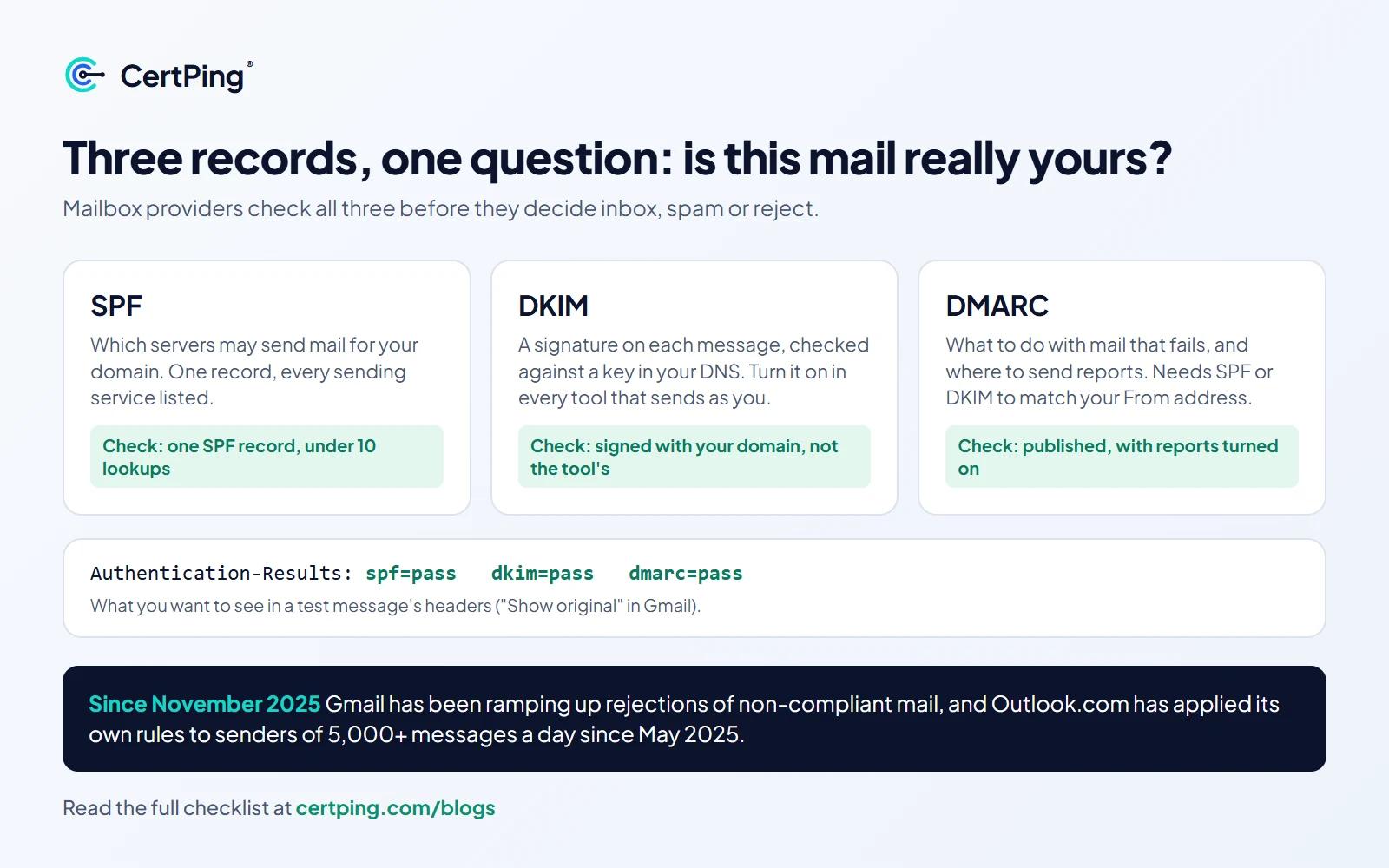
SPF is one DNS record (a TXT record starting v=spf1) that lists the servers and services allowed to send email for your domain, such as Google Workspace, Microsoft 365, your newsletter tool and your store platform.
DKIM: a signature on every message
DKIM adds a hidden signature to each email. The receiving server checks it against a public key you publish in DNS. A valid signature shows the message came from a service you approved and was not changed on the way.
DMARC: the policy and the reports
DMARC is a TXT record at _dmarc.yourdomain.com. It tells receiving servers two things: what to do with mail that fails (p=none to deliver it anyway, p=quarantine to send it to spam, p=reject to refuse it), and where to send daily reports about who is sending as you.
DMARC also checks alignment: the domain in the visible From address must match the domain that passed SPF or DKIM. This is where many setups fail. Your newsletter tool may pass DKIM with its own domain, which does not count for yours.
7 checks before you hit send
You can do the first pass in under an hour with your DNS settings and a list of your tools.
1. List every service that sends as your domain
Think wider than your mailbox. Common senders:
- Your mailbox provider (Google Workspace, Microsoft 365)
- Newsletter and marketing tools
- Your online store or booking platform (order confirmations)
- Invoicing and accounting software
- Helpdesk and live-chat tools
- Your website's contact form
Each one needs to be covered by SPF, DKIM or both. A tool you forgot is the most common reason real mail fails.
2. Make sure you have exactly one SPF record
Two SPF records on the same domain is an error, and receivers may ignore both. Merge them into one. Then count the include: parts: SPF allows at most 10 DNS lookups in total. Every include for a service uses at least one, and some use several. Over the limit, SPF fails even for real mail. Remove services you no longer use.
3. Turn on DKIM in every sending tool, with your domain
Most tools have a "domain authentication" or "custom DKIM" setting that gives you one or two DNS records to add. Until you do, many sign with their own domain, which passes DKIM but does not align with yours. Check this in each tool from step 1.
4. Publish a DMARC record, with reports on
If you have no DMARC record, start with:
v=DMARC1; p=none; rua=mailto:dmarc-reports@yourdomain.com
p=none changes nothing about delivery. It switches on the reports, so you can see every service sending as your domain, including ones you did not know about. Gmail requires a DMARC record from bulk senders, and p=none meets that requirement.
5. Check alignment with a real test message
Send a test from each tool to a Gmail address. Open it, choose Show original, and look for:
spf=pass, dkim=pass and dmarc=pass
If DMARC fails while SPF or DKIM passes, alignment is the problem: the tool is authenticating with its own domain, not yours. Go back to step 3.
6. For marketing email: one-click unsubscribe and low complaints
Google asks bulk senders to support one-click unsubscribe in marketing messages and to keep the rate of messages reported as spam below 0.1%, never reaching 0.3%. Most email tools add the unsubscribe headers for you once your domain is authenticated. Send to people who asked to hear from you, and make leaving easy.
7. Read your bounces
If customers say they did not get an email, ask your email tool for the bounce message. A code like Outlook's 550 5.7.515 or a Gmail error that names SPF, DKIM or DMARC tells you exactly which check failed. Google's error messages name the requirement the mail missed.
After the rush: move from "none" to "reject"
p=none gets your mail delivered and turns on reports, but it does not stop spoofing. Once the reports show that all your real services pass, move to p=quarantine, then p=reject. At that point, fake "order problem" emails using your exact domain get blocked by the receiving servers that honour DMARC, which most large providers do.
Do this in steps, not overnight. Moving to reject before every real sender passes can block your own invoices or receipts.
What to do if your emails are already going to spam
- Check the records first. A free checker shows whether SPF, DKIM and DMARC exist and are valid.
- Fix the sender that fails. Usually one tool is missing DKIM or is not in SPF.
- Allow time for DNS changes. Most changes are visible within minutes to a few hours.
- Watch complaint rates in your email tool. A sudden jump is a sign to pause and clean your list.
- Do not switch tools in a panic. A new tool with no authentication will do worse, not better.
How CertPing helps
CertPing is a domain trust platform: your domains, DNS, certificates and email security in one place.
- Free DMARC checker. CertPing's free SPF, DKIM and DMARC checker reads any domain's public SPF, DKIM, DMARC and MX records and shows whether someone could send email as it. No account needed, and nothing in your DNS changes.
- Setup in one step. Tick the services that send your email. On CertPing DNS the records are written for you; at another DNS provider you get the exact records to copy, and CertPing checks that they are live.
- DMARC reports and a Senders view. CertPing reads your DMARC reports and lists every service sending as your domain. Approve your own and mark the rest as not you.
- A guided move to quarantine and reject. When your approved senders pass, CertPing offers the next step. Nothing changes until you confirm, and you can go back a step at any time.
- Alerts and a weekly digest for a new sender, a drop in passing mail or a weaker record.
Email security is part of the Domain Security bundle, and your first bundle is free.
To be clear about the limits: receiving mail servers enforce DMARC, not CertPing, and CertPing does not manage your marketing lists, unsubscribe links or spam complaint rates. It makes sure the authentication part is right.
Frequently asked questions
Why are my emails going to spam all of a sudden?
Often because a mailbox provider tightened its rules, or because you added a new sending tool without adding it to SPF and DKIM. Check your records and send a test to Gmail to see which check fails.
Do Gmail's rules apply if I send fewer than 5,000 emails a day?
The strictest rules are for bulk senders, but Gmail asks all senders to set up SPF or DKIM. Without them, your mail is more likely to be filtered.
Is DMARC p=none enough?
It meets the bulk-sender requirement and turns on reports, but it does not block anyone spoofing your domain. Treat it as the first step on the way to quarantine and reject.
What does "550 5.7.515 Access denied" mean?
It is Outlook.com's rejection for high-volume senders whose domain does not meet its authentication rules. Fix SPF, DKIM and DMARC alignment for the domain in your From address.
How long do SPF, DKIM and DMARC changes take to work?
Usually minutes to a few hours, depending on your DNS settings. DMARC reports arrive about once a day from each provider that sends them.
Sources: Google, "Email sender guidelines FAQ", Gmail Help; Microsoft Defender for Office 365 Blog, "Strengthening Email Ecosystem: Outlook's New Requirements for High-Volume Senders", 2 April 2025; KnowBe4, "KnowBe4 Warns Shoppers to Stay Alert as Black Friday Phishing Rises 82% in Early November", 19 November 2026.