Letting an Old Domain Expire? Someone Else Can Pick It Up and Read Its Email. 6 Steps Before You Let Go
An expired domain goes back on sale with its history attached. Drop-catchers can reuse your old links, your reputation and the email still sent to it. Six steps before you stop renewing a domain.
Year end is when many businesses tidy up. The old brand you replaced, the campaign site from three years ago, the domain of the company you bought: their renewals come up, and "do we still need this?" sounds like an easy saving.
It is worth a second look. When you stop renewing a domain, it does not disappear. After a waiting period it goes back on sale, and specialists buy names with history within moments of their release. Whoever gets it inherits more than a name: old links, bookmarks, search rankings, and often a steady stream of email still sent to your old addresses.
Here is how that happens, why it is in the news this year, and six steps to take before you let a domain go.
What happens after you stop renewing
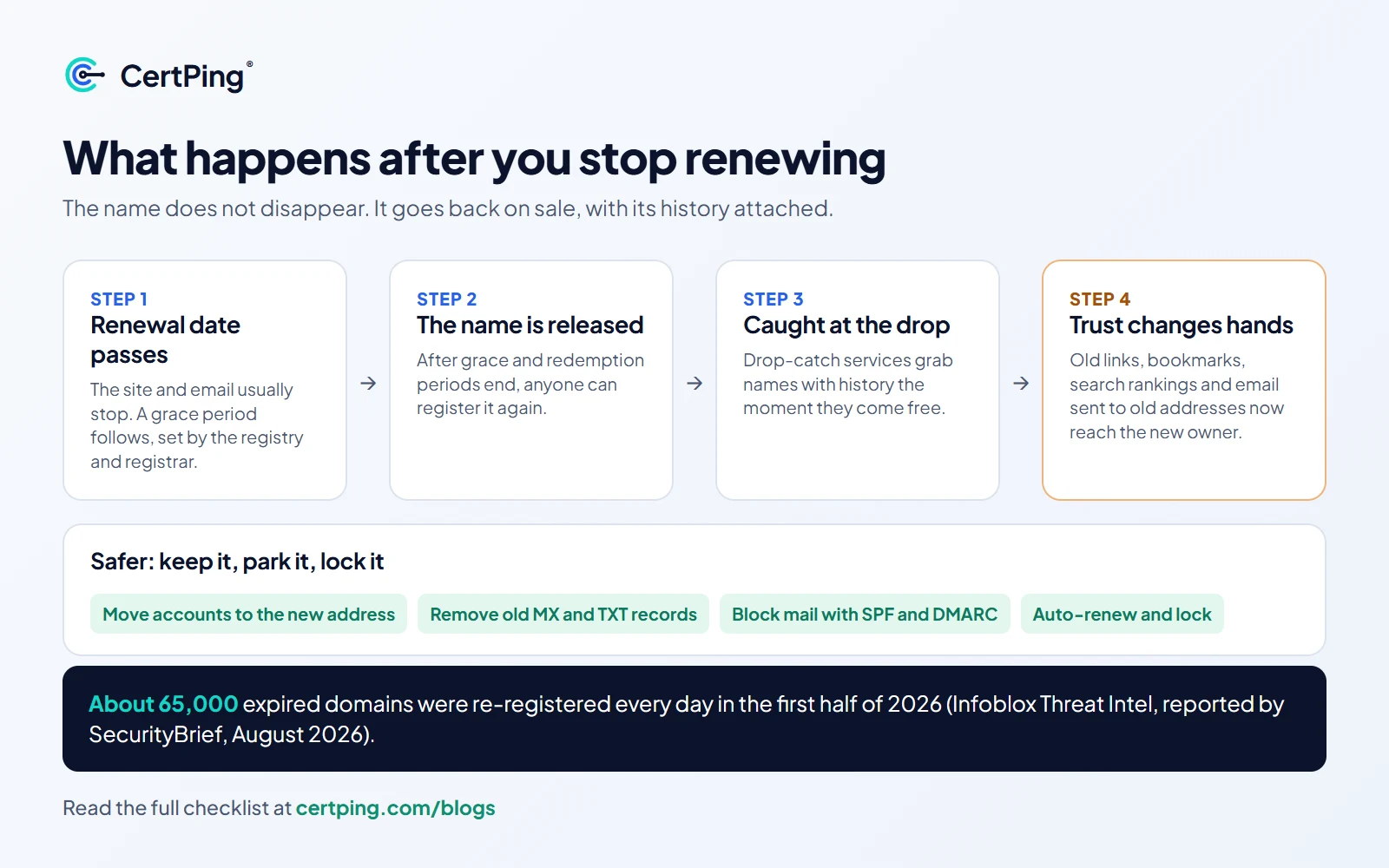
- The renewal date passes. Your website and email usually stop working. Most registries and registrars allow a grace period in which you can still renew, followed by a redemption period that often costs extra. The exact lengths depend on the domain ending and the registrar.
- The name is released. When those periods end, the domain is deleted from the registry and anyone can register it.
- It is caught at the drop. "Drop-catch" services watch for expiring names with traffic or history and try to register them the moment they come free.
- Trust changes hands. The new owner now controls what your old address shows, and where its email goes.
Why this is in the news
The volume is large. In August 2026, SecurityBrief reported research by Infoblox Threat Intel: about 65,000 expired domains were re-registered every day in the first half of 2026, nearly 20% of the newly observed domains on a typical day. The researchers said one actor had spent more than USD 7 million acquiring more than 10,000 of them. "The sheer volume of dropcatch domains is astounding," said Dr Renée Burton, VP of Infoblox Threat Intel.
Authorities are warning small organisations. In March 2026 the Swiss National Cyber Security Centre (NCSC) described reports of abandoned company and association websites reappearing online, either as near-identical copies or with unrelated content. It listed what fraudsters did with them:
- impersonated the former business, using customers' saved bookmarks and old invoices
- ran fake closing-down sales that asked for advance payment
- contacted former partners and customers from the familiar domain
- sent "system migration" emails asking people to log in again
- reused the domains of medical practices, law firms and associations for gambling or fake shops, where search engines kept ranking them because of the domain's history
The NCSC also warned that a new owner can set up a catch-all mailbox, receive mail sent to any old address on the domain, and use it to reset passwords on accounts that were registered with those addresses.
The pattern is not new. Security researchers have shown for years that buying abandoned domains of law firms and other businesses brings in a steady stream of confidential email, without breaking into anything. What has changed is the scale and the automation.
Why your old domain is worth more than it looks
- Email keeps arriving for years. Old customers, suppliers, newsletters, government portals and automated systems keep writing to addresses they saved long ago.
- Accounts may still be tied to it. A bank login, a supplier portal, a social media account or a domain registrar account registered to
name@old-domain.comcan be taken over through "forgot password". - Links and QR codes live on. Printed brochures, old blog posts, partner websites and email signatures still point to it.
- Search engines remember. A domain with history can rank well for a while, which is why fraudsters pay for it.
- Your name is on it. Even if the new owner does nothing illegal, customers will connect whatever appears there with your business.
6 steps before you let a domain go
1. Decide whether you really need to let it go
For most businesses the cheapest protection is to keep the domain. A renewal is usually a small cost next to one fraud case. The Swiss NCSC's advice is to "treat a domain like a brand": keep control when a business or brand closes, and point the old domain to a closing notice or redirect it to the new organisation.
Keep anything that was used for email, printed on materials, or known to customers. Consider letting go only of names that were registered but never used.
2. Move every account to a new email address
Before a domain lapses, search your password manager and inboxes for every account that uses an address on it. Change the login email on:
- banks, payment providers and accounting software
- insurers, tax and government portals
- suppliers, marketplaces and software subscriptions
- social media and advertising accounts
- the registrar and DNS accounts themselves
This is the step that stops a password reset reaching a stranger.
3. Tell people, and remove the old address
Update email signatures, website footers, invoice templates and partner listings. Send a short notice to customers and suppliers with your new address, and ask them to update their records. Remove the domain from newsletters and any tool that still sends from it.
4. If you keep it, park it safely
A domain you keep but no longer use should be locked down, not left half-configured:
- Redirect the website to your current site, or show a simple page that says the business has moved.
- Remove old MX records so mail is not delivered anywhere you no longer watch. The NCSC recommends deleting MX (email) and TXT (verification) records before a domain expires.
- Publish "this domain sends no email" records: an SPF record of
v=spf1 -alland a DMARC record withp=reject. Together they tell receiving servers to refuse mail that claims to come from the domain, so nobody can spoof it. - Turn on auto-renew and registrar lock, and keep the registrar account on a shared address with strong sign-in.
5. If you must let it go, clean up first
If a domain really has to go, remove its DNS records before it expires: MX, TXT verification records, and records that point to services you still use. Delete any sending setup in your email tools. Then the new owner inherits as little as possible.
6. Keep watching your name
After a domain is released, check now and then what it shows. Also watch for look-alike domains: someone who misses your old domain at the drop may register a near copy instead. If you see a copy of your old site or a fake shop using your name, report it to the registrar and hosting provider, and warn your customers.
What to do if someone already has your old domain
- Change the email address on every account that still uses the old domain, starting with banks and email accounts.
- Warn customers and suppliers that the old domain is no longer yours and they should not pay or log in through it.
- Collect evidence with screenshots and dates if it is used to impersonate you.
- Report abuse to the registrar and hosting provider. If your trademark is being used to deceive, a dispute process such as the UDRP may be an option; take legal advice.
How CertPing helps
CertPing is a domain trust platform: your domains, DNS, certificates and email security in one place.
- Renewal reminders and auto-renew. CertPing reminds you about 30 and 7 days before each renewal date, and again after expiry if a domain has not renewed, so an important domain does not lapse by accident.
- Registrar lock and DNS in one place. Transfer lock is on by default for domains you register or transfer with CertPing, and managed DNS with DNSSEC is included, so retiring a domain safely is a few changes on one screen.
- Lockdown for domains that never send email. For parked or redirect-only domains, CertPing's email security sets up records that reject all mail claiming to be from them, on CertPing DNS or as records to copy.
- Look-alike watch. The phishing watch checks new registrations for look-alikes of your domain, such as typos, swapped characters and your name on other endings, and alerts you with the reason and a risk level. The free look-alike domain checker shows which common imitations are already registered.
Email security and the look-alike watch are part of the Domain Security bundle, and your first bundle is free.
To be clear about the limits: once a domain has been released and registered by someone else, no registrar can take it back for you. Keeping it, or cleaning up before it goes, is the protection.
Frequently asked questions
What happens when a domain expires?
The website and email usually stop. After a grace period and often a redemption period, the registry deletes the domain and anyone can register it.
What is drop catching?
Registering a domain the moment it is released after expiry. Specialist services do it automatically, especially for names with traffic, links or history.
Can someone read my email if they buy my old domain?
They can receive any new mail sent to addresses on it, for example with a catch-all mailbox. They cannot read old messages stored in your previous mailbox, but they can use incoming mail to reset passwords on accounts still tied to those addresses.
Should I keep old domains after a rebrand?
Usually yes, for at least a few years, and longer if they were used for email or printed materials. Redirect them to your new site and lock down their email.
How do I stop anyone sending email from a parked domain?
Publish an SPF record of v=spf1 -all and a DMARC record with p=reject, and remove MX records if the domain receives no mail.
Sources: Swiss National Cyber Security Centre (NCSC), "Week 9: When old domain names fall into the wrong hands", 3 March 2026; SecurityBrief UK, reporting Infoblox Threat Intel research on expired domains, 17 August 2026.