Forgotten DNS Records Can Hand Your Subdomains to Strangers. 5 Checks to Close the Gap
A subdomain that still points at a deleted cloud service can be taken over and used for phishing under your name. What dangling DNS is, why it is trending, and five checks any team can run this week.
Most companies have more subdomains than they remember: shop.yourcompany.com for an old store, promo.yourcompany.com for a campaign that ended, help.yourcompany.com for a support tool you replaced. Each one is a line in your DNS settings that sends visitors somewhere.
When the thing at the other end is deleted but the DNS line stays, the subdomain still points at an empty spot in someone else's cloud. If a stranger can claim that empty spot, they control what your subdomain shows. That is a subdomain takeover, and the forgotten record that makes it possible is called dangling DNS.
It is one of the cheapest ways to borrow a trusted name. Here is how it works, why it is in the news, and five checks you can make without being a DNS expert.
How a forgotten record becomes someone else's website
A typical story goes like this:
- Your team runs a holiday campaign on a page hosted by a cloud or marketing service. To give it a nice address, someone adds a DNS record:
promo.yourcompany.compoints to that service. - The campaign ends. The page, the storage space or the app is deleted to save money.
- Nobody removes the DNS record, because nothing seems broken. Visitors just get an error page.
- Months later, someone scanning the internet finds that
promo.yourcompany.compoints to a resource name that is free again. They create a resource with the same name on the same service. - Your subdomain now shows their page. It can host a fake login, a fake invoice portal or a "special offer" that takes card details, and the address bar shows your real domain.
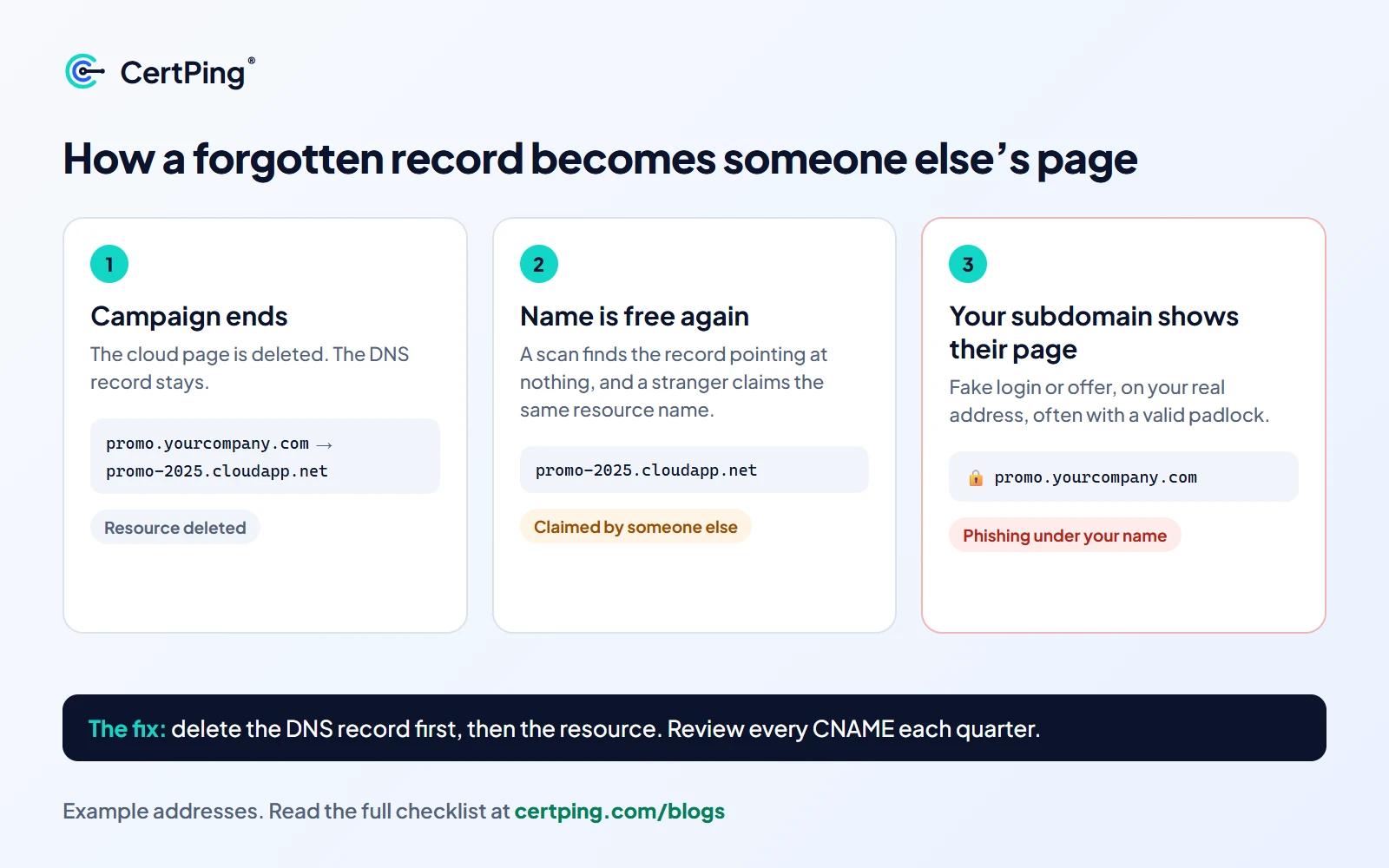
Nobody had to break into your company. The attacker only claimed something you had stopped paying for, while your DNS kept sending people there.
Why it matters more than it sounds
- It uses your name, not a look-alike. Customers and staff are taught to check the address. A taken-over subdomain passes that check, because it really is your domain.
- It can get a valid padlock. Free certificate services check that you control the address, so whoever controls the subdomain can usually get a real HTTPS certificate for it. The padlock proves the connection is encrypted, not that the page is yours.
- It can bypass filters. Email and web filters often trust established domains more than new ones. A page on your subdomain inherits some of that trust.
- It is easy to find at scale. Scanning DNS records for names that point at deleted resources is automated work.
Why it is trending now
In July 2026, SecurityWeek reported on research by the security firm Silent Push, which it called "DangleGeddon". The researchers used AI tools to sort through about 12,500 domains and narrowed them to "several hundred exploitable targets", forgotten records that could be claimed. In one case, a US federal government domain had a record pointing to an unassigned cloud storage container. The researchers said a takeover there "allowed the creation of phishing pages bypassing government trust filters". They ran their tests safely and left disclosure notices on the affected subdomains.
The lesson for everyone else: what once took a patient attacker now takes a script, so old records get found faster. Large companies with big security teams were on the list too. A small business with three agencies and a decade of DNS changes is not less exposed.
5 checks to make this week
You do not need special tools for the first pass. You need your DNS records list and someone who remembers what each service was for.
1. Export or screenshot your DNS records
Open your domain's DNS settings at your DNS provider and list every record. Pay most attention to:
- CNAME records: one name pointing to another name, often a cloud or SaaS service (for example
something.azurewebsites.net,something.s3.amazonaws.com,something.herokuapp.comor a marketing tool's domain). - A records pointing to IP addresses at cloud providers. An IP you released can be handed to another customer.
- NS records for subdomains, which hand a whole subdomain to another DNS provider.
2. For each one, ask: does the thing at the other end still exist and still belong to us?
Visit each subdomain in a browser. Warning signs:
- An error page from a cloud or SaaS provider, such as "NoSuchBucket", "404 Web Site not found", "There isn't a GitHub Pages site here" or "This app is not found"
- A page you do not recognise
- A certificate warning on a subdomain that used to work
If you cannot say who owns the target, treat the record as suspect.
3. Delete the DNS record first, then the resource
When you retire a campaign page, an app or a storage bucket, remove the DNS record before you delete the service it points to. Doing it the other way round opens the gap, even if only for a day. Add this step to your offboarding checklist for agencies and projects.
4. Give every record an owner
Keep a simple shared list: subdomain, what it is for, who owns it, and the date it was last checked. When someone leaves or a contract with an agency ends, walk through their rows. Most dangling records come from projects whose owner moved on.
5. Watch for certificates you did not ask for
Every publicly trusted HTTPS certificate is recorded in public Certificate Transparency logs. Free search tools such as crt.sh let you look up every certificate issued for your domain and its subdomains. A certificate for a subdomain you do not recognise, or one issued by a company you do not use, is worth a closer look. It can be the first sign that someone else controls part of your name.
What to do if you find one
- Remove the DNS record right away. That cuts the link, even before you understand everything.
- Check whether anyone claimed the target. If the subdomain showed someone else's content, take screenshots for your records first.
- Look for certificates issued for that subdomain in Certificate Transparency logs, and ask the issuing authority to revoke any you did not request.
- Warn your team and customers if the subdomain was used in links you sent before, such as old emails, QR codes or printed flyers.
What this looks like in CertPing
CertPing is a domain trust platform: your domains, DNS, certificates and email security in one place.
- Managed DNS keeps every record for your domain in one list, so the review above is one screen rather than a hunt across providers.
- Registrar lock is on by default for domains you register or transfer with CertPing, and DNSSEC is included with DNS hosting. These protect the domain itself. A dangling record is a different problem: the record is valid, it just points somewhere that is no longer yours. Reviewing your records is still the fix.
- SSL certificates: Let's Encrypt certificates are free on every plan, with email reminders before they expire, so retired services do not leave you with broken padlocks either.
- Look-alike watch: if attackers cannot take over your subdomain, they often register a look-alike instead. CertPing's free look-alike checker shows which common imitations of your domain are already registered, and the phishing watch checks new registrations daily. Your first Domain Security bundle is free.
To be clear about the limits: CertPing does not automatically scan your records for dangling targets today. The checks above are the way to find them.
Frequently asked questions
What is a subdomain takeover?
It is when someone else gains control of what one of your subdomains shows, usually because a DNS record still points to a cloud or SaaS resource you deleted, and they claimed that resource.
What is dangling DNS?
A DNS record that points to something that no longer exists or no longer belongs to you, such as a deleted storage bucket, app or website. The record "dangles" with nothing at the end, until someone else attaches something.
Can a taken-over subdomain have a valid HTTPS padlock?
Often, yes. Certificate services check who controls the address, and after a takeover that is the attacker. The padlock means the connection is encrypted, not that the page belongs to you.
Does DNSSEC stop subdomain takeovers?
No. DNSSEC proves your DNS answers have not been tampered with on the way. A dangling record is a genuine answer that you published yourself, so DNSSEC signs it like any other.
How often should we review DNS records?
At least every quarter, and every time a project, agency contract or tool ends. A quick review is far cheaper than cleaning up after a phishing page on your own name.
Sources: SecurityWeek, "DangleGeddon: AI Could Weaponize Forgotten DNS Records at Global Scale", 30 July 2026, reporting Silent Push research.