Domain Security Guide: How to Stop Phishing, Email Spoofing and DNS Hijacking
How attackers abuse your domain through look-alike domains, spoofed email and DNS hijacking, and how SPF, DKIM, DMARC, registrar lock and look-alike monitoring stop each one. Includes a safe DMARC rollout and a checklist.
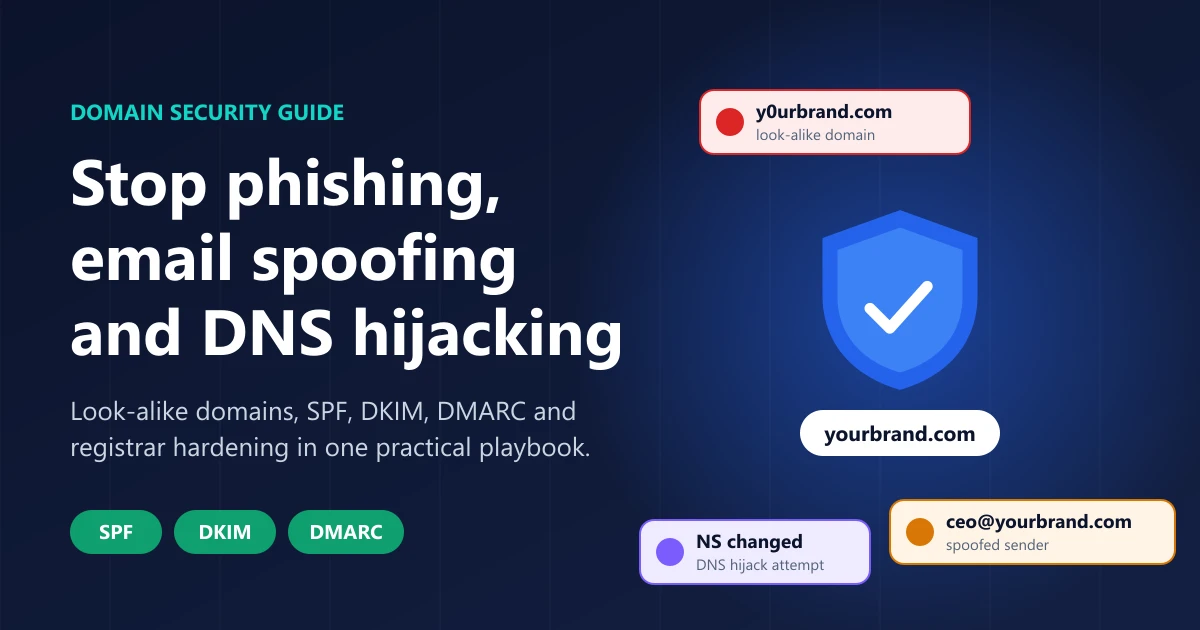
Your domain is the one thing every customer, partner and mail server uses to decide whether a message or website is really you. That makes it the most valuable thing an attacker can borrow. Domain security is the work of making sure nobody else can speak with your domain's voice: not through a look-alike name, not through spoofed email, and not by taking over your DNS.
This guide explains the three attacks that abuse domain trust, the controls that stop each one, and a checklist you can finish this week.
Key takeaways
- Attackers borrow your domain's trust in three ways: look-alike domains, spoofed email and DNS hijacking. Each needs a different defense.
- SPF, DKIM and DMARC stop criminals from sending mail as your exact domain, but only once DMARC reaches
p=quarantineorp=reject. Ap=nonerecord only reports. - DMARC does not stop look-alike domains, display-name tricks or a hacked mailbox. You need separate monitoring for domains that copy your name.
- DNS hijacking usually starts at the registrar or DNS account, not in DNS itself. Registrar lock, phishing-resistant MFA and change alerts close that door.
- Gmail, Yahoo and Outlook.com now require SPF, DKIM and DMARC from bulk senders, so email authentication is also a deliverability requirement.
What is domain security?
Domain security is the set of controls that protect a domain name and everything that depends on it: your website, your email, your certificates and your customers' trust. It covers four layers:
- Ownership: who controls the registrar account and can change the domain.
- DNS: where the domain points, including web, mail and verification records.
- Email authentication: which servers may send mail as the domain (SPF, DKIM and DMARC).
- Brand impersonation: domains that are not yours but look like they are.
Most security programs cover one or two of these. Phishing campaigns go after whichever layer is left open.
Why phishing still starts with a domain
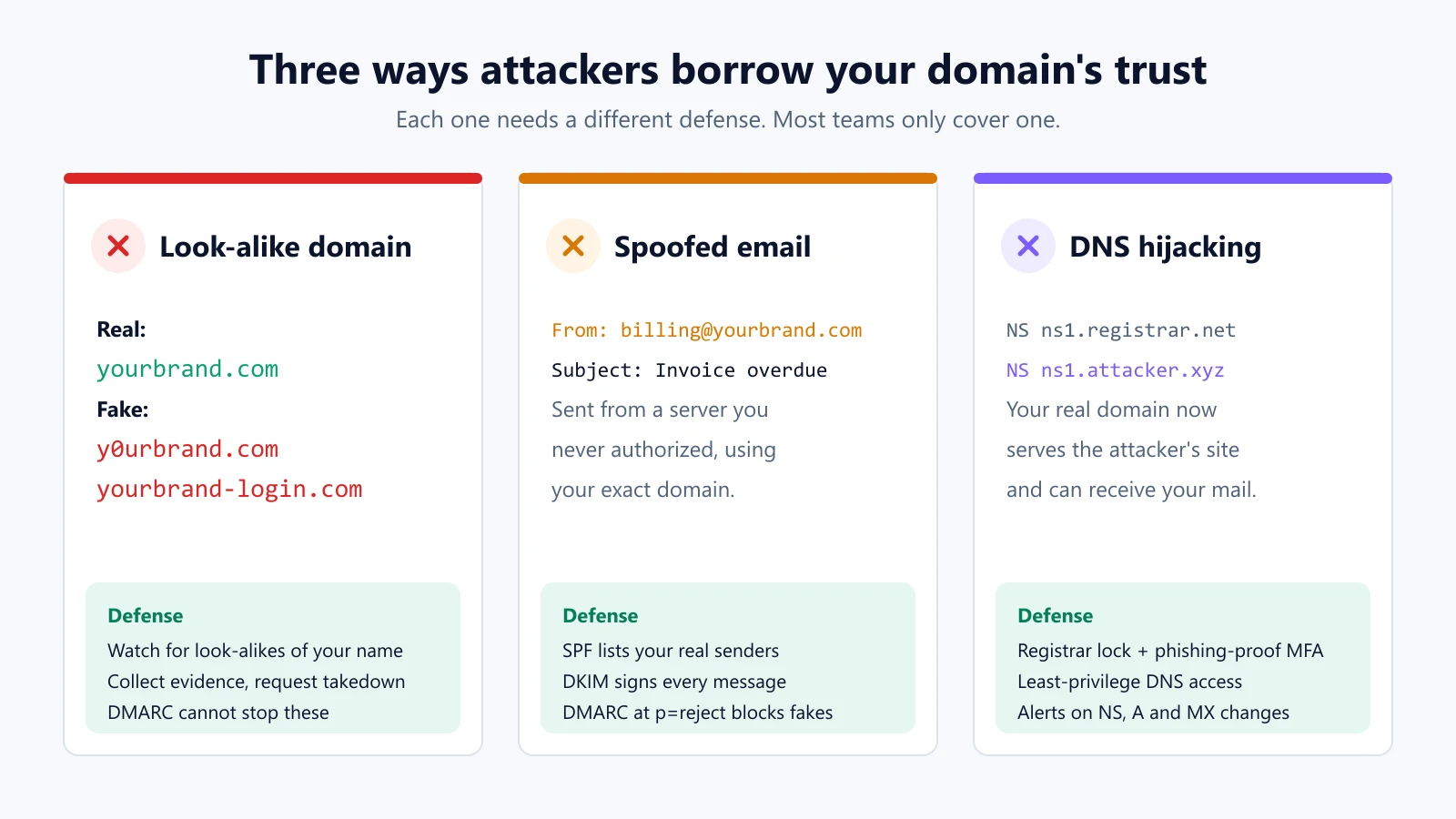
A phishing message works when the reader believes it comes from someone they trust, and the first thing they check is the domain. Attackers have three ways to make that check pass.
1. Look-alike domains
A look-alike (or typosquatted) domain swaps a character, adds a word or uses another ending: y0urbrand.com, yourbrand-login.com, yourbrand.co. The attacker owns that domain outright, so it can have valid SPF, DKIM and DMARC records of its own and a valid HTTPS certificate. Mail from it passes authentication, because it really does come from the attacker's domain.
That is why the padlock is not proof of legitimacy. HTTPS only says the connection is encrypted to the domain in the address bar, not that the domain belongs to who it claims to be.
2. Spoofed email from your exact domain
If your domain has no DMARC policy, or a policy of p=none, anyone can send mail with your exact address in the From line, for example billing@yourbrand.com, from a server you never authorized. Many receiving servers will deliver it. This is the classic setup for invoice fraud and business email compromise.
3. DNS hijacking
DNS hijacking means an attacker changes where your real domain points. With your nameservers or A records under their control, your genuine URL serves their phishing page, and with your MX records they can receive your mail. The domain is not a look-alike: it is yours, so even careful users are fooled.
Hijacks rarely break DNS itself. They usually come through a stolen registrar or DNS-provider login, a social-engineered support desk, or an over-privileged API token. In 2019 the US Cybersecurity and Infrastructure Security Agency issued Emergency Directive 19-01 after a wave of DNS tampering against government domains. It ordered agencies to audit DNS records, change DNS account passwords, add MFA and monitor certificate logs.
A recent example: phishing risk after a data exposure
On October 30, 2026, Chainalysis disclosed a security incident in which customer names, email addresses and organization role labels were accessed. Data like that is exactly what a targeted phishing campaign needs. The attacker knows who to write to, what role they have and which vendor to pretend to be.
A breach like this tests every layer at once. Can attackers send mail as the vendor's real domain? Have they registered a look-alike to host a fake login page? Would anyone notice if the vendor's DNS changed? The organizations that come through best answer all three before an incident, not after.
How SPF, DKIM and DMARC work together
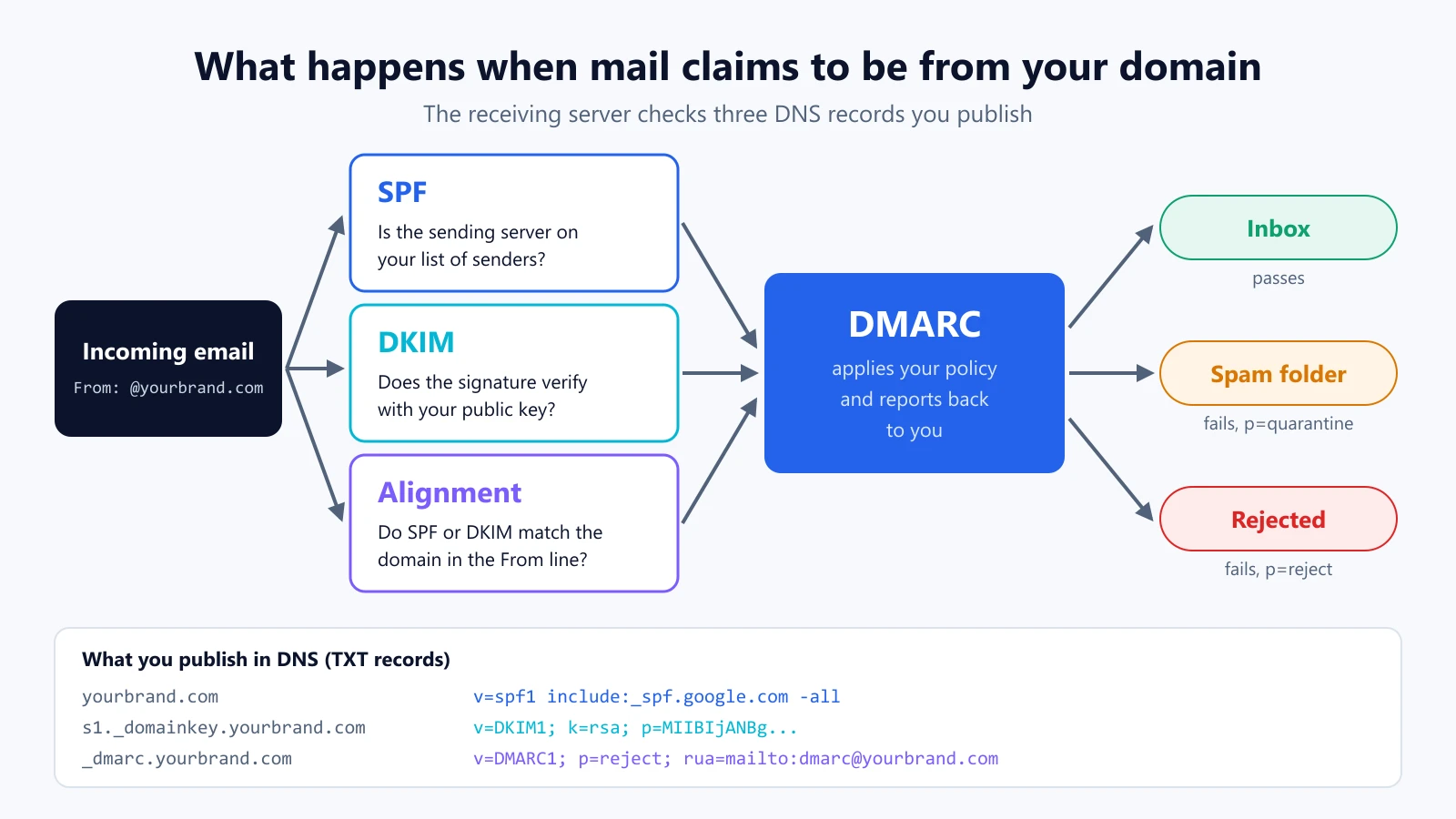
These three DNS records are the foundation of email security. Each answers a different question for the receiving mail server.
SPF (Sender Policy Framework)
SPF is a TXT record that lists the servers allowed to send mail for your domain. The receiver checks whether the connecting server is on that list.
yourbrand.com. TXT "v=spf1 include:_spf.google.com include:sendgrid.net -all"
SPF has two well-known limits. It checks the hidden envelope sender, not the From address people see, and a record may trigger at most 10 DNS lookups before it fails. Teams that add every new tool to SPF often hit that limit without noticing.
DKIM (DomainKeys Identified Mail)
DKIM adds a cryptographic signature to each message. Your mail provider signs with a private key, and you publish the matching public key in DNS. A valid signature proves the message came from a holder of the key and was not changed on the way.
s1._domainkey.yourbrand.com. TXT "v=DKIM1; k=rsa; p=MIIBIjANBgkqh..."
Use 2048-bit keys where your provider supports them, and give every service that sends as you its own DKIM selector.
DMARC (Domain-based Message Authentication, Reporting and Conformance)
DMARC ties the two together. It requires that SPF or DKIM not only pass but align with the domain in the visible From line. It then tells receivers what to do with mail that fails, and it sends you reports about who is sending as your domain.
_dmarc.yourbrand.com. TXT "v=DMARC1; p=reject; rua=mailto:dmarc@yourbrand.com; adkim=s; aspf=s"
The policy tag p= is what matters:
p=noneonly monitors. Spoofed mail is still delivered.p=quarantinesends failing mail to spam.p=rejectrefuses failing mail outright. This is the only setting that fully stops exact-domain spoofing.
How to reach DMARC p=reject without breaking your email
Jumping straight to p=reject can block your own invoices, newsletters or HR system. The safe path is gradual, and the DMARC reports tell you when to move.
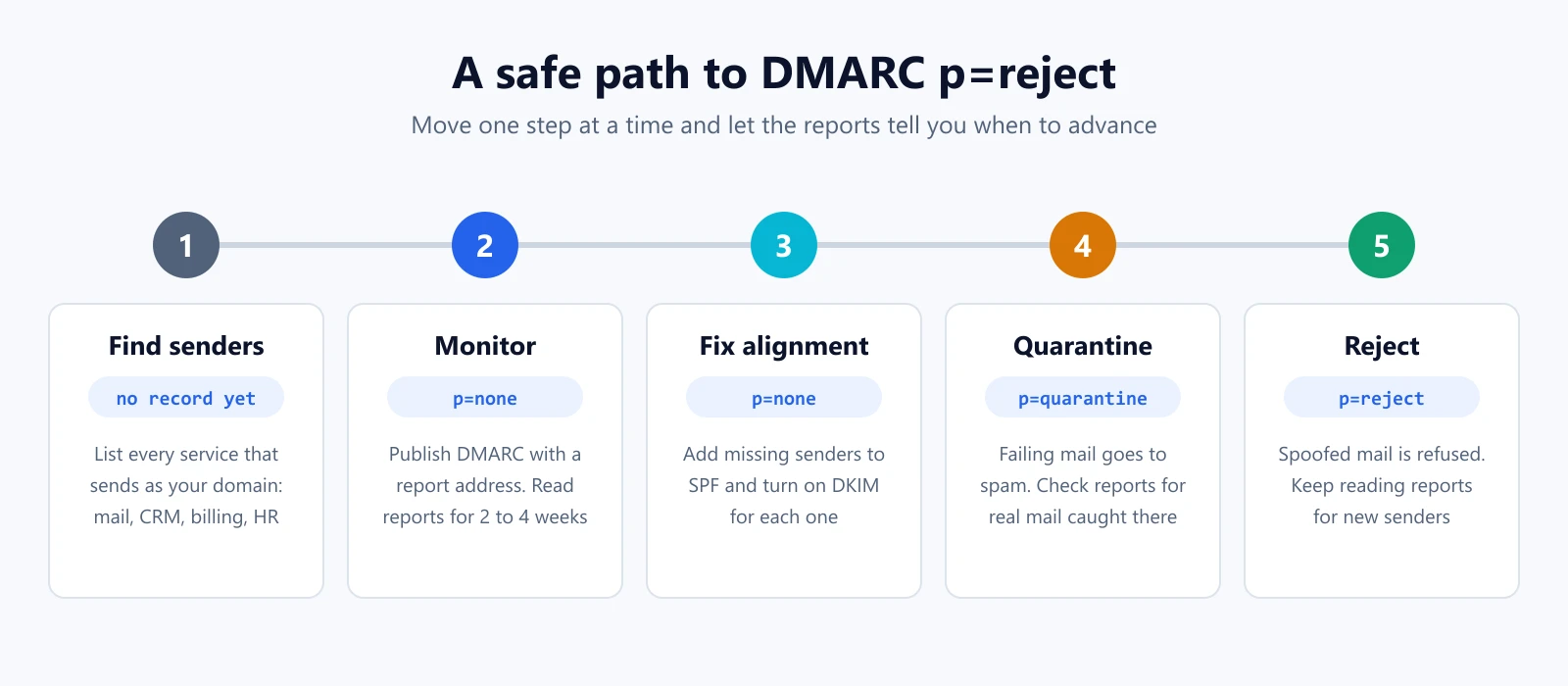
- Find every sender. List each service that sends as your domain: your mailbox provider, CRM, billing, support desk, marketing platform and HR tools.
- Publish
p=nonewith a report address. Read the aggregate reports for two to four weeks. They show every source sending as your domain and whether it passes. - Fix alignment. Add legitimate senders to SPF, turn on DKIM signing for each one with your domain, and retire services nobody owns.
- Move to
p=quarantine. Keep watching the reports for real mail that lands in spam. - Move to
p=reject. Keep reading reports, because new tools get added and someone will forget to set them up.
Don't forget domains that never send mail. A parked domain should publish v=spf1 -all and a p=reject DMARC record so attackers cannot use it either.
Why DMARC alone is not enough
DMARC is essential, but it protects exactly one thing: your exact domain in the From line. It does not stop:
- Look-alike domains.
yourbrand-billing.comis a different domain with its own valid records. - Display-name spoofing. "YourBrand Support" sent from a free webmail address.
- Compromised mailboxes. Mail sent from a real, hacked account passes every check.
- DNS hijacking. If an attacker controls your DNS, they control your SPF, DKIM and DMARC records too.
A complete domain security program covers each of these gaps with its own control.
How to stop look-alike phishing domains
You cannot register every possible typo, so the practical defense is detection and response:
- Watch for look-alikes of your name. Track registrations that copy your brand with swapped characters, extra words or other endings.
- Judge the risk. A look-alike with MX records, a live login page or a fresh certificate is far more dangerous than a parked one.
- Capture evidence before you act. Save screenshots, WHOIS and DNS data, then report the domain to its registrar, its hosting provider and browser blocklists.
- Register the obvious ones. Buy your main name in the endings your customers use most, and the most common misspellings of it.
- Tell customers how you contact them. State which domains you send from and that you never ask for passwords or payment changes by email.
A trademark helps here too. A registered mark makes takedown requests and domain disputes much stronger.
How to prevent DNS hijacking
Protect the accounts that can change your domain, not just the records:
- Turn on registrar lock (transfer lock) so the domain cannot be moved without your approval.
- Use phishing-resistant MFA such as security keys or passkeys on registrar and DNS accounts, and remove shared logins.
- Limit who can change DNS. Give API tokens the narrowest scope possible and rotate them.
- Alert on changes to NS, A, AAAA, CNAME, MX and TXT records, so an unexpected change is caught in minutes rather than days.
- Watch certificate issuance. Certificate Transparency logs show every public certificate issued for your domain, which often reveals a hijack.
- Keep renewals and contacts current. An expired domain or an old admin email is an easy way in.
- Plan your incident channel. Decide in advance how you will reach customers if your website or email can no longer be trusted.
Email authentication is now a deliverability rule, not just security
Since February 2024, Google has required anyone sending more than 5,000 messages a day to Gmail accounts to authenticate with SPF and DKIM and publish a DMARC record (Google's sender guidelines). Yahoo set similar rules, and Microsoft began enforcing comparable requirements for Outlook.com in 2025. Payment security standard PCI DSS 4.0 also expects organizations to have controls that detect and protect against phishing.
In other words, the same records that stop spoofing now decide whether your legitimate mail reaches the inbox.
Domain security checklist
This week:
- Turn on registrar lock and phishing-resistant MFA for every registrar and DNS account.
- Check your SPF record: is every real sender listed, and are you under 10 lookups?
- Turn on DKIM for your mailbox provider and each sending service.
- Publish a DMARC record with a report address, even if it starts at
p=none.
This month:
- Read your DMARC reports and fix every legitimate sender that fails alignment.
- Move to
p=quarantine, thenp=reject. - Lock down parked domains with
v=spf1 -allandp=reject. - Start watching for look-alike domains of your brand.
Ongoing:
- Review DMARC reports and look-alike findings, and act on them.
- Alert on DNS changes and new certificates for your domain.
- Keep every domain renewed, with current contacts.
How CertPing helps
CertPing is a domain trust platform that brings these layers together in one place:
- Email security: set up SPF, DKIM and DMARC in one step, or copy the records yourself. DMARC reports come with a Senders view, and a guided path takes you from monitoring to quarantine and reject.
- Anti-phishing: catch look-alike domains that copy your name, with the reason and risk for each finding, and work each one through investigation, evidence and escalation.
- Domain registration and managed DNS: register or transfer your domains with DNS and transfer lock included.
- SSL certificates: Let's Encrypt certificates are free on every plan.
- Trademarks: search and watch USPTO filings for marks like yours.
Your first Domain Security bundle is free. It covers a look-alike phishing watch for one domain, email security for one domain and a USPTO watch for one trademark. See pricing for extra bundles.
Frequently asked questions
What is the difference between phishing and email spoofing?
Phishing is the scam: a message designed to trick someone into clicking, paying or sharing credentials. Spoofing is one technique phishing uses, where the sender address is forged to look like a trusted domain. DMARC stops spoofing of your exact domain; it does not stop phishing from look-alike domains.
Do I need SPF, DKIM and DMARC if I use Google Workspace or Microsoft 365?
Yes. Your mail provider signs and sends your mail, but only you can publish the DNS records that tell other servers it is legitimate. Without them, attackers can spoof your domain and your own mail is more likely to land in spam.
Is DMARC p=none enough?
p=nonecollects reports but asks receivers to deliver spoofed mail anyway. It is the right first step, not the goal. Move top=quarantineand thenp=rejectonce your legitimate senders pass.
How long does it take to reach DMARC p=reject?
For a small organization with a few senders, often two to six weeks. Larger organizations with many sending services can take a few months. The DMARC reports tell you when every legitimate sender passes.
Can DMARC stop look-alike domains?
- DMARC only protects the exact domain it is published on. A look-alike domain is a different domain with its own records, so it needs detection and takedown instead.
What is the first sign of DNS hijacking?
Often a change nobody requested: new nameservers, a changed A or MX record, a certificate issued that your team did not order, or customers reporting a login page that looks slightly wrong. Alerts on DNS changes and certificate issuance catch it early.
Does HTTPS mean a website is safe?
- HTTPS means the connection is encrypted to the domain in the address bar. Attackers can get a valid certificate for a look-alike domain they own, so always check the full domain, not just the padlock.