A Real Padlock on a Fake Site: How DNS Hijacks Get Attackers Valid HTTPS Certificates
This month attackers changed DNS records at three country-code registries and got real HTTPS certificates for Google domains. What happened, why a padlock is not proof, and five checks that protect your own domain.
For years, people were told to "look for the padlock" before typing a password or card number. The padlock still matters. But two stories from November 2026 show what it does and does not promise, and why the protection that counts sits further back, in who controls your domain's DNS.
What happened this month
Registries breached, certificates issued. SSL.com's November 2026 Trust Briefing (17 November) reported that attackers breached the operators of three country-code domain registries: Ghana, Sierra Leone and American Samoa. They then changed DNS records for Google and other domains. In the briefing's words, "because certificate authorities validate ownership through DNS, the attackers obtained unauthorized HTTPS certificates." Chrome blocked the certificates and Google worked with the issuing authorities to revoke them. Google also said it could not guarantee that it had found every affected domain.
A DNS hijack used to deliver a backdoor. Earlier in the month, on 4 November, The Hacker News reported ESET research on a group it calls SlippyNunchucks. The group hijacked DNS lookups for the Windows version of the Sogou Input Method, a popular keyboard app, so that a plain HTTP request for its settings went to the attackers' server instead, and used that to install a backdoor. The fix, released on 29 October as version 16.10, moved those requests to HTTPS (CVE-2026-120422).
The two stories point the same way. Whoever controls the DNS answer for a name can usually prove "ownership" of it to the outside world, and an HTTPS certificate proves control of the name, not good intentions.
Why a padlock is not proof
When you visit a site over HTTPS, the padlock tells you two things: the connection is encrypted, and a certificate authority checked that whoever asked for the certificate controlled that domain name at that moment.
That check usually happens through DNS or through the website itself. The authority asks the requester to publish a code in a DNS record, or to serve it from the site. If an attacker can change your DNS, for example through your registrar account, your DNS provider or even the registry above them, they can pass that check. They get a certificate that browsers accept, and their fake site shows a normal padlock.
That is why the strongest protection is not on the website. It is on everything that decides what your domain points to.
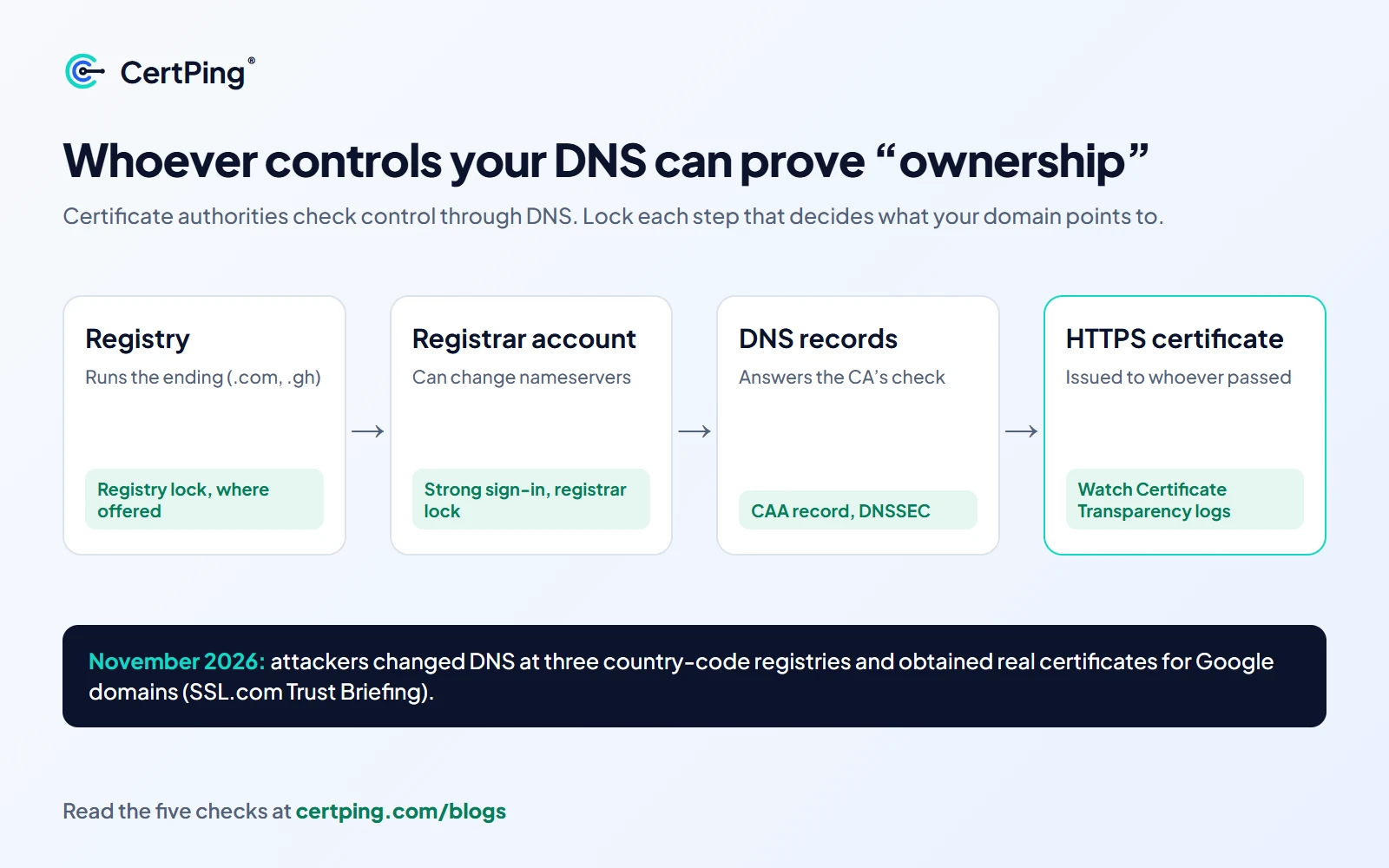
5 checks for your own domain
1. Lock down the account that controls your domain
Your registrar account can change your nameservers, and your nameservers decide everything else. Use the strongest sign-in your registrar offers (an authenticator app or security key, not just a password), remove people who have left, and make sure renewal and security emails reach a shared inbox. A registrar lock stops the domain being transferred to another company without your approval.
For a domain your whole business depends on, ask whether your registry offers a registry lock. It needs a manual, out-of-band confirmation before nameserver changes go through. Not every registry or registrar offers it, and it usually costs extra, but it is designed for exactly the attack in the news.
2. Publish a CAA record
A CAA (Certification Authority Authorization) DNS record lists which certificate authorities may issue certificates for your domain, for example only Let's Encrypt. Authorities must check it before issuing. It will not stop an attacker who controls your whole DNS, because they can change the CAA record too. It does stop mistakes and many lesser attacks, such as someone using a different authority with a weaker check. It is one DNS record and costs nothing.
3. Watch Certificate Transparency logs
Every publicly trusted certificate is written to public Certificate Transparency logs. Free tools such as crt.sh let you search for every certificate ever issued for your domain and its subdomains. Check it now and then, and especially after any DNS or registrar change:
- A certificate for a subdomain you do not use
- A certificate from an authority you have never used
- A burst of certificates on one day that nobody on your team requested
Any of these is worth an hour of investigation. Transparency logs are how unauthorised certificates are usually found after the fact.
4. Turn on DNSSEC, and know what it covers
DNSSEC signs your DNS answers, so resolvers can tell if someone forged them on the way, for example on a compromised network. It protects against tampering between your DNS provider and the visitor. It does not help when the attacker changes the records at the source, at your registrar, DNS provider or registry, because the changed records are then the "real" ones. Turn it on, and still do checks 1 to 3.
5. Prefer short-lived certificates and automated renewal
The industry is moving to shorter certificate lifetimes: 200 days now, 100 in 2027 and 47 days by 2029. Shorter lifetimes limit how long a wrongly issued certificate stays useful, and they push everyone towards automated renewal, which also removes "forgot to renew" outages. If your certificates still need a person to renew them, now is the time to automate.
What to do if you find a certificate you did not request
- Check your DNS and registrar first. Look for changed nameservers or records, new users or recent logins you do not recognise.
- Change credentials and turn on strong sign-in for the registrar and DNS provider accounts.
- Ask the issuing certificate authority to revoke the certificate. Each publishes a way to report misissued or unauthorised certificates.
- Warn staff and customers if there is any chance a fake site used your name.
Where CertPing fits
CertPing is a domain trust platform, and the checks above map onto it directly:
- Registrar lock is on by default for domains you register or transfer with CertPing, so a domain cannot be moved away without your approval.
- DNS hosting with DNSSEC is included, so your records sit in one place with signing turned on.
- Free Let's Encrypt certificates on every plan. The certificates CertPing issues last 45 days, and CertPing emails a reminder every day from 30 days before one expires, so short lifetimes do not turn into outages.
- Email security (SPF, DKIM and DMARC in one step) and a look-alike phishing watch cover the other ways attackers borrow your name. Your first Domain Security bundle is free.
To be clear about the limits: no registrar can stop a breach at a registry operator, and CertPing does not offer registry lock today. What you control is your own account, your records and how quickly you notice a certificate you did not ask for.
Frequently asked questions
Can a phishing site have a valid SSL certificate?
Yes. A certificate shows that whoever requested it controlled the domain name at that moment. Phishing sites on look-alike domains, taken-over subdomains or hijacked DNS can all show a normal padlock.
What is Certificate Transparency?
A public, append-only record of every certificate that browsers trust. Certificate authorities must log each certificate they issue, so domain owners can search the logs for certificates they did not request.
What does a CAA record do?
It names the certificate authorities allowed to issue certificates for your domain. Authorities must check it before issuing. It reduces risk but does not help if an attacker controls your whole DNS.
Does DNSSEC prevent DNS hijacking?
It prevents forged answers between your DNS provider and the visitor. It does not stop someone who changes the records at your registrar, DNS provider or registry, which is why account security matters too.
Sources: SSL.com, "The Trust Briefing November 2026", 17 November 2026; The Hacker News, "China-Aligned Hackers Hijack Sogou Input Method DNS Requests to Deploy DarkVigil Backdoor", 4 November 2026.